
Whoa Sign Meme Generator
Create Your Whoa Sign Meme
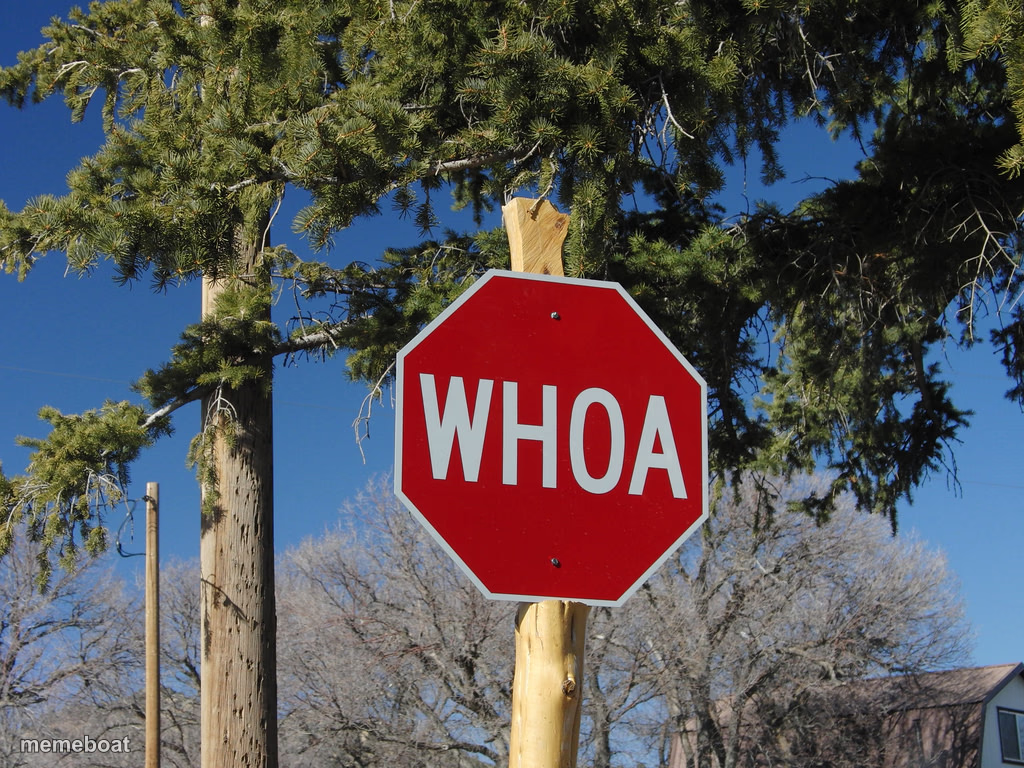
A red stop sign reading WHOA nailed to a tree instead of a real post — perfect for reacting to shocking news or hitting the brakes on a bad idea. Caption it free.
Blank Whoa Sign meme template
Download the blank Whoa Sign template to caption it yourself, or add your text right here in the editor above and download the finished meme.
When to use the Whoa Sign meme
- Reacting to a group chat message that came out of nowhere
- That moment a plan takes a sudden, unplanned left turn
- Someone about to do something everyone can see is a bad idea
- The instant a plot twist lands in a movie or show
Whoa Sign template facts
- Dimensions
- 1024 × 768 px
- Format
- JPG
- Text boxes
- 2
- Added
- 2025
About the Whoa Sign meme template
Somebody swapped out the standard octagon and just went with WHOA, which honestly says more than STOP ever did. It's nailed to a literal tree trunk like a prop from a low-budget western, and that's what makes it so quotable — nobody planned this, it just happened.
Use it whenever something needs a hard record-scratch: an unhinged group chat message, a plot twist, a coworker's terrible idea, or anytime you need the visual equivalent of screeching tires. It's a one-word gut reaction sign, so keep your caption just as blunt.
Popular Whoa Sign caption ideas
SOMEONE IN THE GROUP CHAT · SAYS SOMETHING UNHINGED
MY BRAIN · DURING A PLOT TWIST
FRIEND STARTS A TERRIBLE IDEA · WITH "HOLD MY BEER"
Templates similar to Whoa Sign



Whoa Sign meme FAQ
How do I make a Whoa Sign meme?
Scroll up to the Whoa Sign template, type your caption into the 2 text boxes in the editor above, adjust the font, size and color if you like, then click download. Your finished Whoa Sign meme is ready to share in seconds.
Can I use the Whoa Sign template for free?
Yes. The Whoa Sign template is completely free to use — no signup and no limits on how many memes you create or where you share them.
How do I download my Whoa Sign meme?
Click the download button under the editor once your Whoa Sign meme looks right. It saves straight to your device as a high-quality PNG or JPEG image.
How do I download the blank Whoa Sign template?
Use the "Download blank template" button in the blank Whoa Sign template section above to save the original, un-captioned image — handy if you'd rather caption it in another app or keep a copy.