
who asked Meme Generator
Create Your who asked Meme
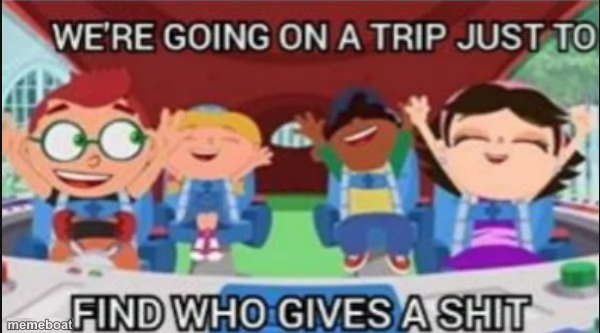
Cartoon kids cheering on a ride, captioned about a pointless trip to find who cares — perfect for dismissive, sarcastic 'who asked' jokes. Caption and download free.
Blank who asked meme template
Download the blank who asked template to caption it yourself, or add your text right here in the editor above and download the finished meme.
When to use the who asked meme
- dismissing unsolicited opinions
- sarcastic non-caring reaction
- mocking a pointless effort
who asked template facts
- Dimensions
- 600 × 333 px
- Format
- PNG
- Text boxes
- 2
- Added
- 2025
About the who asked meme template
The "who asked" meme template has become a staple in internet culture, symbolizing witty and often sarcastic responses to unsolicited opinions or comments. Emerging around 2018 on platforms like Twitter and Reddit, this viral phenomenon quickly gained traction as a humorous way to dismiss irrelevant or unwanted input. Rooted deeply in meme culture, the "who asked" meme captures the essence of online banter and social media comedy, making it a go-to format for expressing playful skepticism or mockery in digital conversations.
Knowing how to use the "who asked" meme effectively can elevate your social media content with relatable humor. This meme template is perfect for funny reactions, sarcastic remarks, and highlighting moments when someone’s opinion is clearly uninvited. Whether you’re posting on Instagram, Twitter, Facebook, or TikTok, understanding when to post a "who asked" meme can maximize engagement by tapping into shared experiences of online interactions. It’s ideal for creating content that resonates with audiences who appreciate sharp, comedic commentary on everyday digital dialogues.
The popularity of the "who asked" meme endures because it’s easy to create, customize, and share across all social media channels. Our free online meme generator lets you instantly generate personalized "who asked" memes with custom text—no design skills needed. This quick and user-friendly meme maker empowers you to build viral, funny content that stands out and drives social media engagement. Start making your own "who asked" memes now to join millions who use this trending template for hilarious, shareable entertainment.
Popular who asked caption ideas
THEY MADE A WHOLE SPEECH JUST TO · FIND WHO GIVES A SHIT
WE DROVE ALL DAY JUST TO · REALIZE NOBODY ASKED
I OPENED THE GROUP CHAT JUST TO · SEE WHO CARES
Templates similar to who asked

who asked meme FAQ
How do I make a who asked meme?
Scroll up to the who asked template, type your caption into the 2 text boxes in the editor above, adjust the font, size and color if you like, then click download. Your finished who asked meme is ready to share in seconds.
Can I use the who asked template for free?
Yes. The who asked template is completely free to use — no signup and no limits on how many memes you create or where you share them.
How do I download my who asked meme?
Click the download button under the editor once your who asked meme looks right. It saves straight to your device as a high-quality PNG or JPEG image.
How do I download the blank who asked template?
Use the "Download blank template" button in the blank who asked template section above to save the original, un-captioned image — handy if you'd rather caption it in another app or keep a copy.