
Podcast Panel Reactions Meme Generator
Create Your Podcast Panel Reactions Meme
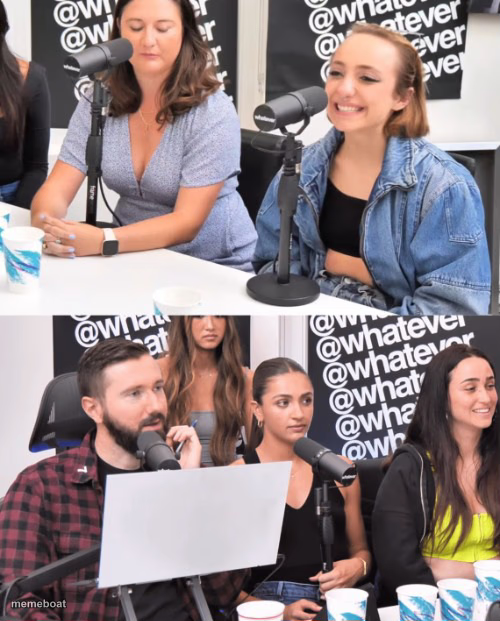
Two rows of podcast guests giving very different reactions — bored versus laughing. Great for split-opinion captions. Caption and download free.
Blank Podcast Panel Reactions meme template
Download the blank Podcast Panel Reactions template to caption it yourself, or add your text right here in the editor above and download the finished meme.
When to use the Podcast Panel Reactions meme
- When half the room laughs and the other half stares blankly
- Reacting to a joke that only lands with some people
- The split between people who get the reference and people who don't
- One person still talking while everyone else has moved on
Podcast Panel Reactions template facts
- Dimensions
- 500 × 621 px
- Format
- JPG
- Text boxes
- 2
- Added
- 2025
About the Podcast Panel Reactions meme template
Same podcast, two totally different vibes. Up top, one guest looks like she's mentally checked out while the other cracks a small smile. Down below, the whole panel is cracking up except for one guy stuck mid-sentence. It's the perfect setup for 'some people get it, some people don't.'
Use it whenever a group reacts in wildly different ways to the same thing — one half bored to tears, the other half having the time of their life.
Popular Podcast Panel Reactions caption ideas
SOMEONE MENTIONS CRYPTO · EVERYONE ELSE IN THE ROOM
WHEN THE JOKE · ONLY HALF THE ROOM GETS
ME EXPLAINING MY BUDGET · MY BANK ACCOUNT







Podcast Panel Reactions meme FAQ
How do I make a Podcast Panel Reactions meme?
Scroll up to the Podcast Panel Reactions template, type your caption into the 2 text boxes in the editor above, adjust the font, size and color if you like, then click download. Your finished Podcast Panel Reactions meme is ready to share in seconds.
Can I use the Podcast Panel Reactions template for free?
Yes. The Podcast Panel Reactions template is completely free to use — no signup and no limits on how many memes you create or where you share them.
How do I download my Podcast Panel Reactions meme?
Click the download button under the editor once your Podcast Panel Reactions meme looks right. It saves straight to your device as a high-quality PNG or JPEG image.
How do I download the blank Podcast Panel Reactions template?
Use the "Download blank template" button in the blank Podcast Panel Reactions template section above to save the original, un-captioned image — handy if you'd rather caption it in another app or keep a copy.