
What the Heck? That Guy Beat Me? Meme Generator
Create Your What the Heck? That Guy Beat Me? Meme
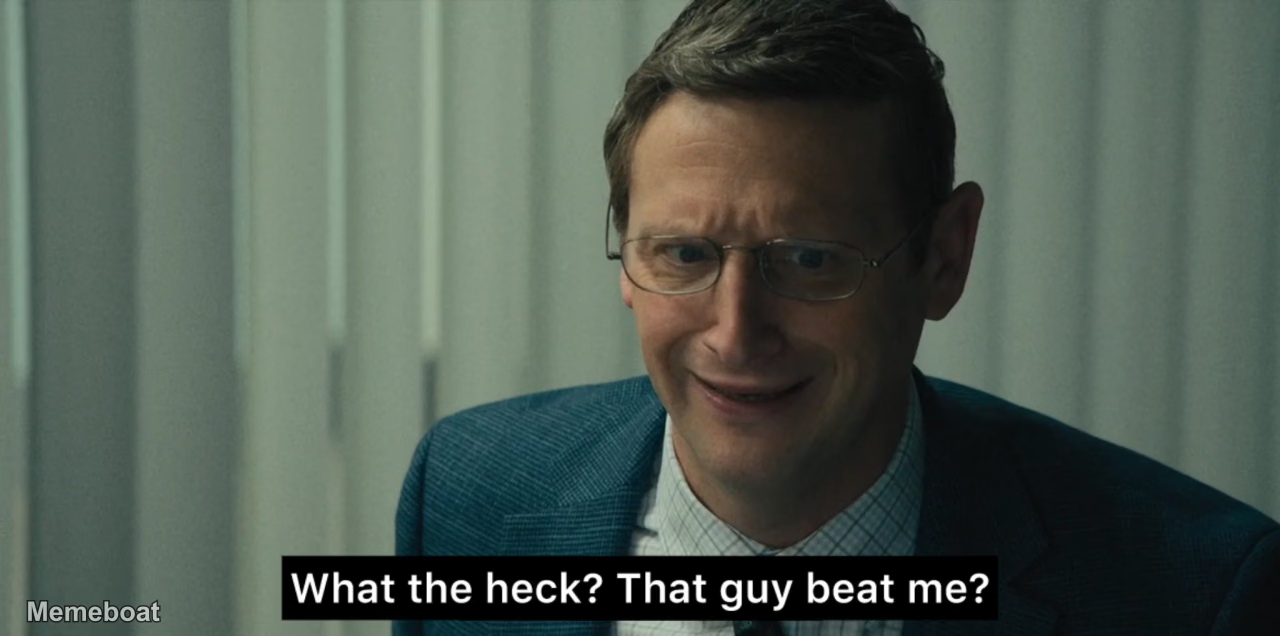
A man in a suit and glasses looks up with a visibly frustrated, surprised, and slightly disgusted expression.
Blank What the Heck? That Guy Beat Me? meme template
Download the blank What the Heck? That Guy Beat Me? template to caption it yourself, or add your text right here in the editor above and download the finished meme.
What the Heck? That Guy Beat Me? template facts
- Dimensions
- 1280 × 636 px
- Format
- WEBP
- Text boxes
- 2
- Added
- 2026
About the What the Heck? That Guy Beat Me? meme template
A man in a suit and glasses looks up with a visibly frustrated, surprised, and slightly disgusted expression. The text overlay indicates he is reacting to someone else's unexpected victory or superior performance, likely in a competitive business scenario.
Popular What the Heck? That Guy Beat Me? caption ideas
Losing a deal to Blue OwlWhat the heck? That guy beat me?
When I apply for the same job as 10000 other peopleWhat the heck? That guy beat me?
Templates similar to What the Heck? That Guy Beat Me?




What the Heck? That Guy Beat Me? meme FAQ
How do I make a What the Heck? That Guy Beat Me? meme?
Scroll up to the What the Heck? That Guy Beat Me? template, type your caption into the 2 text boxes in the editor above, adjust the font, size and color if you like, then click download. Your finished What the Heck? That Guy Beat Me? meme is ready to share in seconds.
Can I use the What the Heck? That Guy Beat Me? template for free?
Yes. The What the Heck? That Guy Beat Me? template is completely free to use — no signup and no limits on how many memes you create or where you share them.
How do I download my What the Heck? That Guy Beat Me? meme?
Click the download button under the editor once your What the Heck? That Guy Beat Me? meme looks right. It saves straight to your device as a high-quality PNG or JPEG image.
How do I download the blank What the Heck? That Guy Beat Me? template?
Use the "Download blank template" button in the blank What the Heck? That Guy Beat Me? template section above to save the original, un-captioned image — handy if you'd rather caption it in another app or keep a copy.