
What bird Meme Generator
Create Your What bird Meme
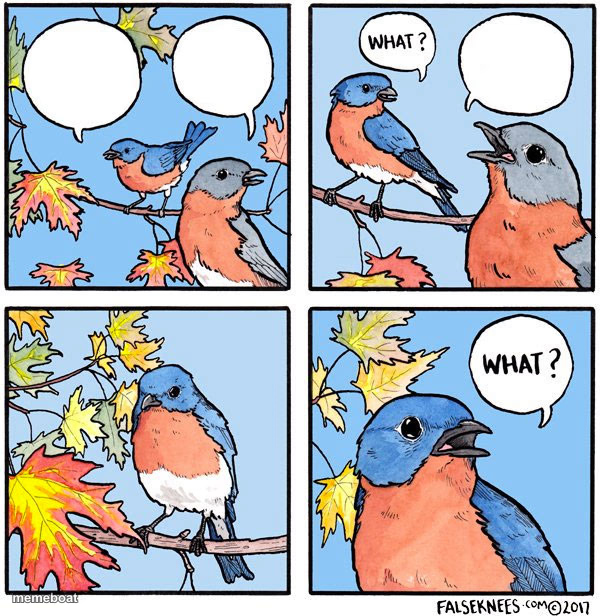
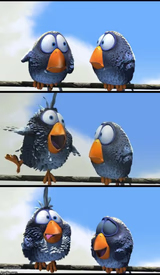
A four-panel bird comic where a confused chick keeps asking 'what?' and getting no real answer — great for miscommunication and repeating-yourself jokes. Free to caption.
Blank What bird meme template
Download the blank What bird template to caption it yourself, or add your text right here in the editor above and download the finished meme.
When to use the What bird meme
- Explaining something and just getting blank confusion back
- A text conversation that devolves into 'wait what' loops
- Trying to communicate with someone who clearly isn't listening
- Group chat miscommunication spiraling into nonsense
What bird template facts
- Dimensions
- 600 × 616 px
- Format
- JPG
- Text boxes
- 3
- Added
- 2025
About the What bird meme template
A little bluebird chick asks something, gets a confused 'what?' back, and by the last panel it's just two birds yelling 'what' at each other with zero progress made. It's the exact rhythm of every conversation that goes in circles because nobody actually heard the first thing said.
Popular What bird caption ideas
Can you grab milk on your way home · What? · WHAT?
I said I'm fine · What? · WHAT?
Turn the music down · What? · WHAT?
Templates similar to What bird



What bird meme FAQ
How do I make a What bird meme?
Scroll up to the What bird template, type your caption into the 3 text boxes in the editor above, adjust the font, size and color if you like, then click download. Your finished What bird meme is ready to share in seconds.
Can I use the What bird template for free?
Yes. The What bird template is completely free to use — no signup and no limits on how many memes you create or where you share them.
How do I download my What bird meme?
Click the download button under the editor once your What bird meme looks right. It saves straight to your device as a high-quality PNG or JPEG image.
How do I download the blank What bird template?
Use the "Download blank template" button in the blank What bird template section above to save the original, un-captioned image — handy if you'd rather caption it in another app or keep a copy.