
30 Rock Blurred Message Meme Generator
Create Your 30 Rock Blurred Message Meme
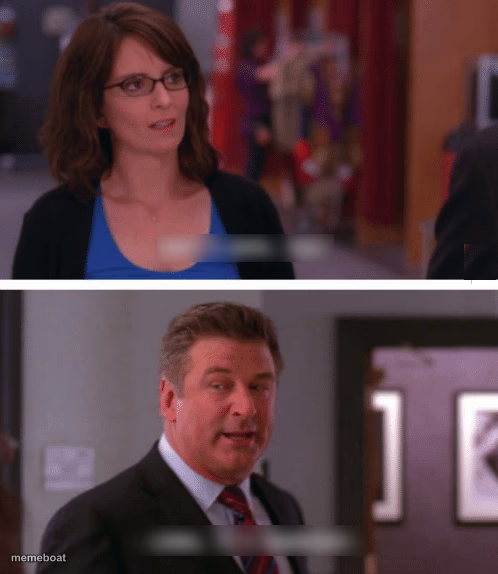
Also known as: What a Week, Huh? · What a Week, Huh? Lemon, It's Wednesday · Tina Fey and Alec Baldwin Dialogue · What a week, huh? 30 Rock
Two-panel 30 Rock scene with a blurred-out text bubble between a surprised woman and a talking man, ready for your own reveal. Fits awkward confession jokes. Caption free.
Blank 30 Rock Blurred Message meme template
Download the blank 30 Rock Blurred Message template to caption it yourself, or add your text right here in the editor above and download the finished meme.
When to use the 30 Rock Blurred Message meme
- revealing an awkward secret
- delivering shocking news
- an uncomfortable confession
- reacting to unexpected information
30 Rock Blurred Message template facts
- Dimensions
- 498 × 574 px
- Format
- JPG
- Text boxes
- 2
- Added
- 2025
About the 30 Rock Blurred Message meme template
The "What a Week, Huh?" meme template originates from the iconic character Liz Lemon, played by Tina Fey in the hit TV show 30 Rock. This meme captures the relatable exhaustion and humor of surviving a challenging week, making it a viral phenomenon across social media platforms since its rise in popularity around the mid-2010s. Rooted deeply in internet culture and meme culture, this template resonates with audiences who appreciate witty, comedic reflections on everyday struggles. Its association with the beloved character Liz Lemon adds a layer of nostalgic entertainment, making it a staple in online humor and viral content.
Using the "What a Week, Huh?" meme template is perfect for expressing feelings of fatigue, relief, or comedic frustration after a long or eventful week. Whether you want to share a funny reaction on Instagram, Twitter, Facebook, or TikTok, this meme fits perfectly in social media content focused on relatable moments and funny reactions. To make the most of this template, consider posting it midweek or on Fridays when audiences are most receptive to humor about the workweek grind. How to use this meme effectively involves customizing text that highlights your unique weekly challenges or victories, making it highly shareable and engaging for your followers.
This meme template remains popular because it is easy to create, customize, and instantly generate viral content without any design skills needed. Our What a Week, Huh? meme generator allows you to personalize your message quickly, producing funny and trending memes that boost social media engagement. With instant results and a user-friendly meme maker, you can build hilarious content that resonates with millions and encourages sharing across platforms. Don’t wait—create your own What a Week, Huh? meme now and join the viral wave of relatable comedy and entertainment!
Popular 30 Rock Blurred Message caption ideas
What a year , huh · It's February
Me: are we still friends? · Them: about that...
Asked what he really thinks · He definitely told me
Checked my bank account · It checked me back
Templates similar to 30 Rock Blurred Message






30 Rock Blurred Message meme FAQ
How do I make a 30 Rock Blurred Message meme?
Scroll up to the 30 Rock Blurred Message template, type your caption into the 2 text boxes in the editor above, adjust the font, size and color if you like, then click download. Your finished 30 Rock Blurred Message meme is ready to share in seconds.
Can I use the 30 Rock Blurred Message template for free?
Yes. The 30 Rock Blurred Message template is completely free to use — no signup and no limits on how many memes you create or where you share them.
How do I download my 30 Rock Blurred Message meme?
Click the download button under the editor once your 30 Rock Blurred Message meme looks right. It saves straight to your device as a high-quality PNG or JPEG image.
How do I download the blank 30 Rock Blurred Message template?
Use the "Download blank template" button in the blank 30 Rock Blurred Message template section above to save the original, un-captioned image — handy if you'd rather caption it in another app or keep a copy.