
#What Meme Generator
Create Your #What Meme
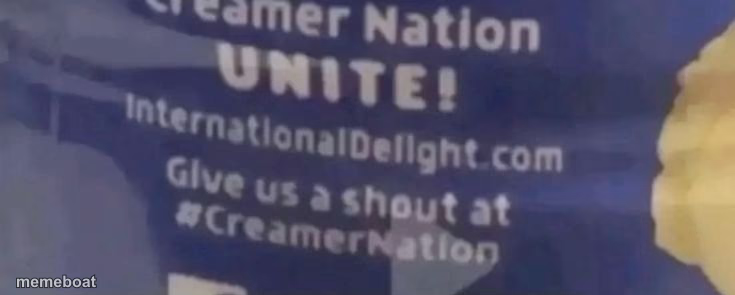
A blurry blue banner reading 'Creamer Nation Unite!' — good for jokes about brand loyalty, weird fandoms, or being way too into something. Caption it free.
Blank #What meme template
Download the blank #What template to caption it yourself, or add your text right here in the editor above and download the finished meme.
When to use the #What meme
- Rallying your friend group around an inside joke like it's a movement
- Being weirdly loyal to a brand nobody else cares about
- That one group chat with a name, a logo, and unnecessary levels of commitment
#What template facts
- Dimensions
- 735 × 295 px
- Format
- PNG
- Text boxes
- 1
- Added
- 2025
About the #What meme template
This one's a screengrab of some International Delight ad banner, blue and blown out, mid-motion blur, with 'Creamer Nation UNITE!' plastered across it. It's the kind of low-fi, so-random-it's-funny image that works because nobody expects a coffee creamer rally cry to become a template.
Use it for anything about niche fandoms, brand tribalism, or rallying people around something dumb but specific — 'when your group chat has a name and a flag.' The blur and the awkward text just add to the chaotic energy.
Popular #What caption ideas
When your coffee creamer preference becomes your entire personality
Me explaining why my group chat needs a rallying cry
Nobody: / This random ad banner: UNITE!



#What meme FAQ
How do I make a #What meme?
Scroll up to the #What template, type your caption into the text box in the editor above, adjust the font, size and color if you like, then click download. Your finished #What meme is ready to share in seconds.
Can I use the #What template for free?
Yes. The #What template is completely free to use — no signup and no limits on how many memes you create or where you share them.
How do I download my #What meme?
Click the download button under the editor once your #What meme looks right. It saves straight to your device as a high-quality PNG or JPEG image.
How do I download the blank #What template?
Use the "Download blank template" button in the blank #What template section above to save the original, un-captioned image — handy if you'd rather caption it in another app or keep a copy.