
wait... nevermind Meme Generator
Create Your wait... nevermind Meme
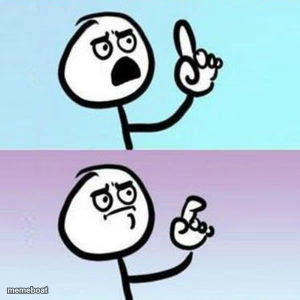
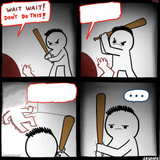
A two-panel stick figure meme going from confident correction to awkward backpedal — perfect for takes you should've kept to yourself. Caption it and download free.
Blank wait... nevermind meme template
Download the blank wait... nevermind template to caption it yourself, or add your text right here in the editor above and download the finished meme.
When to use the wait... nevermind meme
- Correcting someone then realizing you were wrong
- Starting a hot take and immediately regretting it
- Confidently answering a question incorrectly
- Backtracking after checking the facts mid-sentence
wait... nevermind template facts
- Dimensions
- 300 × 300 px
- Format
- JPG
- Added
- 2025
About the wait... nevermind meme template
Top panel: stick figure confidently about to correct someone. Bottom panel: same figure realizing they were wrong and quietly walking it back. We've all been there.
Use it for those moments you open your mouth to sound smart and immediately regret it — corrections that backfire, hot takes that age badly in real time, or any confidently-wrong-then-suddenly-humble moment.
Templates similar to wait... nevermind



wait... nevermind meme FAQ
How do I make a wait... nevermind meme?
Scroll up to the wait... nevermind template, add your own text boxes in the editor above and type your captions, adjust the font, size and color if you like, then click download. Your finished wait... nevermind meme is ready to share in seconds.
Can I use the wait... nevermind template for free?
Yes. The wait... nevermind template is completely free to use — no signup and no limits on how many memes you create or where you share them.
How do I download my wait... nevermind meme?
Click the download button under the editor once your wait... nevermind meme looks right. It saves straight to your device as a high-quality PNG or JPEG image.
How do I download the blank wait... nevermind template?
Use the "Download blank template" button in the blank wait... nevermind template section above to save the original, un-captioned image — handy if you'd rather caption it in another app or keep a copy.