
wacky dawg Meme Generator
Create Your wacky dawg Meme

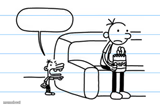
Wacky Dawg comic panel: a kid asks the dog to say something funny, but the dog turns serious instead. Add your own twist and download free.
Blank wacky dawg meme template
Download the blank wacky dawg template to caption it yourself, or add your text right here in the editor above and download the finished meme.
When to use the wacky dawg meme
- Someone asks you to tell a joke and you hit them with bad news instead
- A lighthearted group chat suddenly turns into a serious conversation
- Captioning the moment a funny meeting agenda item becomes a real problem
- Reacting to a comedian or friend who breaks character to say something real
wacky dawg template facts
- Featuring
- Wacky Dawg (Wacky Dawg webcomic by Bryan Little)
- Dimensions
- 972 × 546 px
- Format
- PNG
- Text boxes
- 1
- Added
- 2026
About the wacky dawg meme template
Wacky Dawg is a simple stick-figure-meets-floppy-eared-dog webcomic by Bryan Little, and this panel is the setup where the punchline never lands the way you expect: someone asks for a joke, and the dog gets dead serious instead.
That single blank speech bubble over the big-eyed dog is a perfect canvas for any moment where the mood flips from silly to serious in one beat. Swap in your own "actually, I have something serious on my mind" line for whatever gut-punch, plot twist, or tonal whiplash you're reacting to.
Popular wacky dawg caption ideas
To Howard Copper, If you are reading this Jack is sorry he slapped your Friend, PS, Ryan Johvas You still own Bryan A Dollar
When they ask you to lighten the mood but you just found out the wifi's down
Me after being told to 'say something funny' during a performance review
That moment the group chat goes from memes to 'we need to talk'



wacky dawg meme FAQ
How do I make a wacky dawg meme?
Scroll up to the wacky dawg template, type your caption into the text box in the editor above, adjust the font, size and color if you like, then click download. Your finished wacky dawg meme is ready to share in seconds.
Can I use the wacky dawg template for free?
Yes. The wacky dawg template is completely free to use — no signup and no limits on how many memes you create or where you share them.
How do I download my wacky dawg meme?
Click the download button under the editor once your wacky dawg meme looks right. It saves straight to your device as a high-quality PNG or JPEG image.
How do I download the blank wacky dawg template?
Use the "Download blank template" button in the blank wacky dawg template section above to save the original, un-captioned image — handy if you'd rather caption it in another app or keep a copy.