
Venom And Eddie Brock Meme Generator
Create Your Venom And Eddie Brock Meme
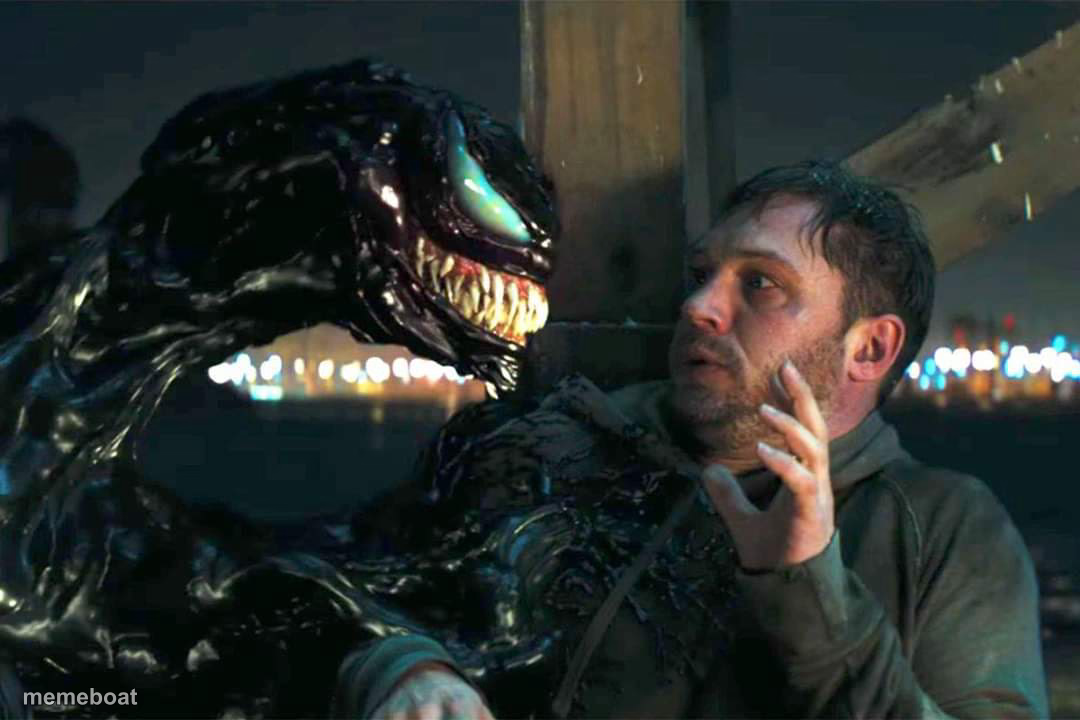
Venom looms over a nervous Eddie Brock, teeth bared inches from his face. Great for inner-monologue and bad-decision jokes — caption it free.
Blank Venom And Eddie Brock meme template
Download the blank Venom And Eddie Brock template to caption it yourself, or add your text right here in the editor above and download the finished meme.
When to use the Venom And Eddie Brock meme
- Your intrusive thoughts talking you into a bad decision
- That one coworker getting way too close during a disagreement
- The moment self-doubt shows up uninvited and won't back off
Venom And Eddie Brock template facts
- Featuring
- Venom (Venom (2018))
- Dimensions
- 1080 × 720 px
- Format
- JPG
- Added
- 2025
About the Venom And Eddie Brock meme template
Venom gets right up in Eddie's face, all teeth and menace, while Eddie just looks like a guy having the worst possible day. It's the perfect visual for that moment your own inner voice starts making terrible suggestions.
Use it for intrusive thoughts, bad angel/devil-on-your-shoulder setups, or just captioning any intimidating confrontation.
Templates similar to Venom And Eddie Brock




Venom And Eddie Brock meme FAQ
How do I make a Venom And Eddie Brock meme?
Scroll up to the Venom And Eddie Brock template, add your own text boxes in the editor above and type your captions, adjust the font, size and color if you like, then click download. Your finished Venom And Eddie Brock meme is ready to share in seconds.
Can I use the Venom And Eddie Brock template for free?
Yes. The Venom And Eddie Brock template is completely free to use — no signup and no limits on how many memes you create or where you share them.
How do I download my Venom And Eddie Brock meme?
Click the download button under the editor once your Venom And Eddie Brock meme looks right. It saves straight to your device as a high-quality PNG or JPEG image.
How do I download the blank Venom And Eddie Brock template?
Use the "Download blank template" button in the blank Venom And Eddie Brock template section above to save the original, un-captioned image — handy if you'd rather caption it in another app or keep a copy.