
upside down cat Meme Generator
Create Your upside down cat Meme
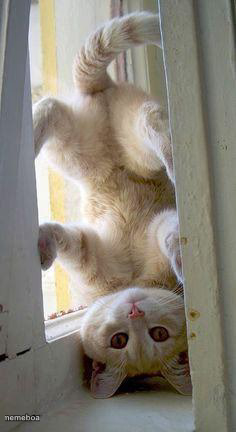
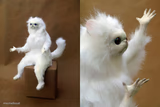
A cream-colored cat hangs upside down in a window frame, paws dangling like it's melting. Perfect for chaos energy captions. Caption it free, no login needed.
Blank upside down cat meme template
Download the blank upside down cat template to caption it yourself, or add your text right here in the editor above and download the finished meme.
When to use the upside down cat meme
- Describing your energy level after a long week
- Reacting to unexpected news that flips your whole day
- Captioning your pet's inexplicable weird behavior
- Showing what your brain looks like on a Monday morning
upside down cat template facts
- Dimensions
- 236 × 432 px
- Format
- JPG
- Added
- 2025
About the upside down cat meme template
This cat has fully given up on the concept of "right side up." Wedged into a window frame, paws dangling, tail curled, it looks like gravity personally offended it and it's not dealing with that today.
Use it for anything unhinged-but-cute: Mondays, hangovers, that feeling after four coffees, or just "me, emotionally, at all times." It's the perfect template for pure gremlin chaos energy.
Templates similar to upside down cat
upside down cat meme FAQ
How do I make a upside down cat meme?
Scroll up to the upside down cat template, add your own text boxes in the editor above and type your captions, adjust the font, size and color if you like, then click download. Your finished upside down cat meme is ready to share in seconds.
Can I use the upside down cat template for free?
Yes. The upside down cat template is completely free to use — no signup and no limits on how many memes you create or where you share them.
How do I download my upside down cat meme?
Click the download button under the editor once your upside down cat meme looks right. It saves straight to your device as a high-quality PNG or JPEG image.
How do I download the blank upside down cat template?
Use the "Download blank template" button in the blank upside down cat template section above to save the original, un-captioned image — handy if you'd rather caption it in another app or keep a copy.