
Up in Arms Bill Cipher Meme Generator
Create Your Up in Arms Bill Cipher Meme
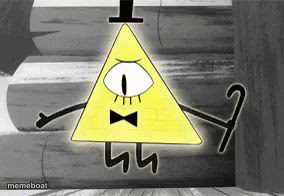
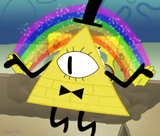
Bill Cipher throwing his little cane arms up in exaggerated frustration from Gravity Falls — great for dramatic overreactions. Free to caption and download.
Blank Up in Arms Bill Cipher meme template
Download the blank Up in Arms Bill Cipher template to caption it yourself, or add your text right here in the editor above and download the finished meme.
When to use the Up in Arms Bill Cipher meme
- Overreacting to someone eating your leftovers
- Losing your mind over a typo you can't unsee
- When the wifi drops for two seconds
- Dramatically 'giving up' on life over something tiny
Up in Arms Bill Cipher template facts
- Featuring
- Bill Cipher (Gravity Falls)
- Dimensions
- 284 × 196 px
- Format
- JPG
- Added
- 2025
About the Up in Arms Bill Cipher meme template
The demonic yellow triangle himself, arms flung up like he just found out the group chat left him on read. Bill Cipher never does anything small, so this is the go-to face for reacting to minor inconveniences like they're the literal apocalypse.
Templates similar to Up in Arms Bill Cipher


Up in Arms Bill Cipher meme FAQ
How do I make a Up in Arms Bill Cipher meme?
Scroll up to the Up in Arms Bill Cipher template, add your own text boxes in the editor above and type your captions, adjust the font, size and color if you like, then click download. Your finished Up in Arms Bill Cipher meme is ready to share in seconds.
Can I use the Up in Arms Bill Cipher template for free?
Yes. The Up in Arms Bill Cipher template is completely free to use — no signup and no limits on how many memes you create or where you share them.
How do I download my Up in Arms Bill Cipher meme?
Click the download button under the editor once your Up in Arms Bill Cipher meme looks right. It saves straight to your device as a high-quality PNG or JPEG image.
How do I download the blank Up in Arms Bill Cipher template?
Use the "Download blank template" button in the blank Up in Arms Bill Cipher template section above to save the original, un-captioned image — handy if you'd rather caption it in another app or keep a copy.