
United Polaris Seat Meme Generator
A first-person view from a luxurious first-class airplane seat, showing a person's legs stretched out, with a silver MacBook laptop open on their lap.
Create Your United Polaris Seat Meme
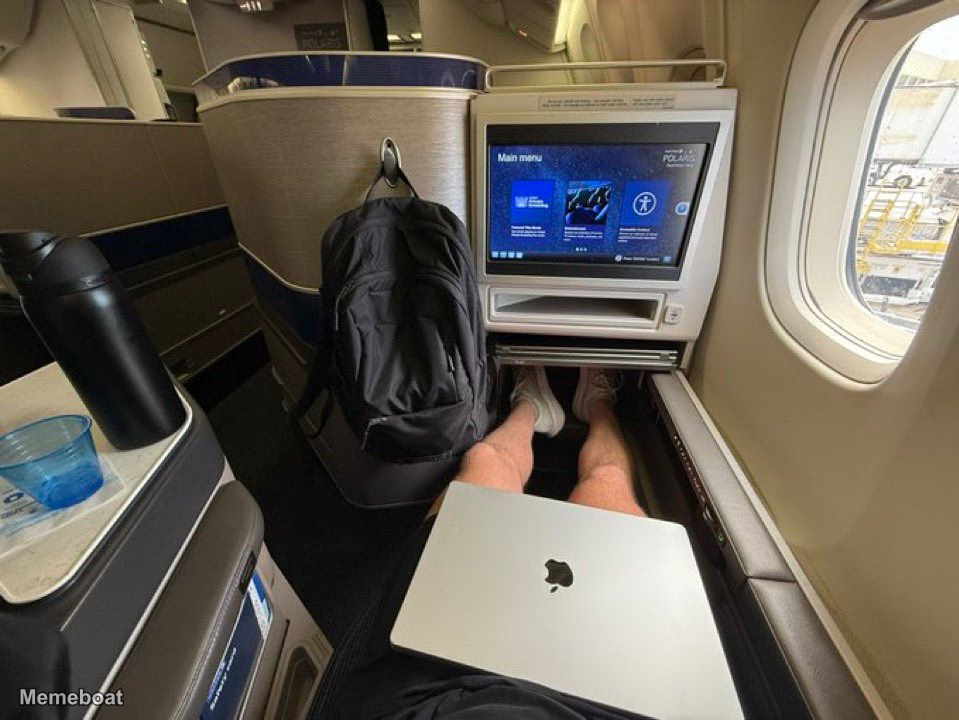
Blank United Polaris Seat meme template
Download the blank United Polaris Seat template to caption it yourself, or add your text right here in the editor above and download the finished meme.
United Polaris Seat template facts
- Dimensions
- 959 × 720 px
- Format
- JPG
- Text boxes
- 1
- Added
- 2026
About the United Polaris Seat meme template
A first-person view from a luxurious first-class airplane seat, showing a person's legs stretched out, with a silver MacBook laptop open on their lap. To the left, a black water bottle and a blue plastic cup are on a tray, and a black backpack hangs from a hook next to the seat. An in-flight entertainment screen displays a "Main menu" and "UNITED POLARIS" branding. Through the window, parts of the airport ground and possibly another aircraft are visible.
Popular United Polaris Seat caption ideas
Thank you python
thank you, HTML
super rich and chinese is the best way to live

United Polaris Seat meme FAQ
How do I make a United Polaris Seat meme?
Scroll up to the United Polaris Seat template, type your caption into the text box in the editor above, adjust the font, size and color if you like, then click download. Your finished United Polaris Seat meme is ready to share in seconds.
Can I use the United Polaris Seat template for free?
Yes. The United Polaris Seat template is completely free to use — no signup and no limits on how many memes you create or where you share them.
How do I download my United Polaris Seat meme?
Click the download button under the editor once your United Polaris Seat meme looks right. It saves straight to your device as a high-quality PNG or JPEG image.
How do I download the blank United Polaris Seat template?
Use the "Download blank template" button in the blank United Polaris Seat template section above to save the original, un-captioned image — handy if you'd rather caption it in another app or keep a copy.