
Startled Cat Falling Meme Generator
Create Your Startled Cat Falling Meme
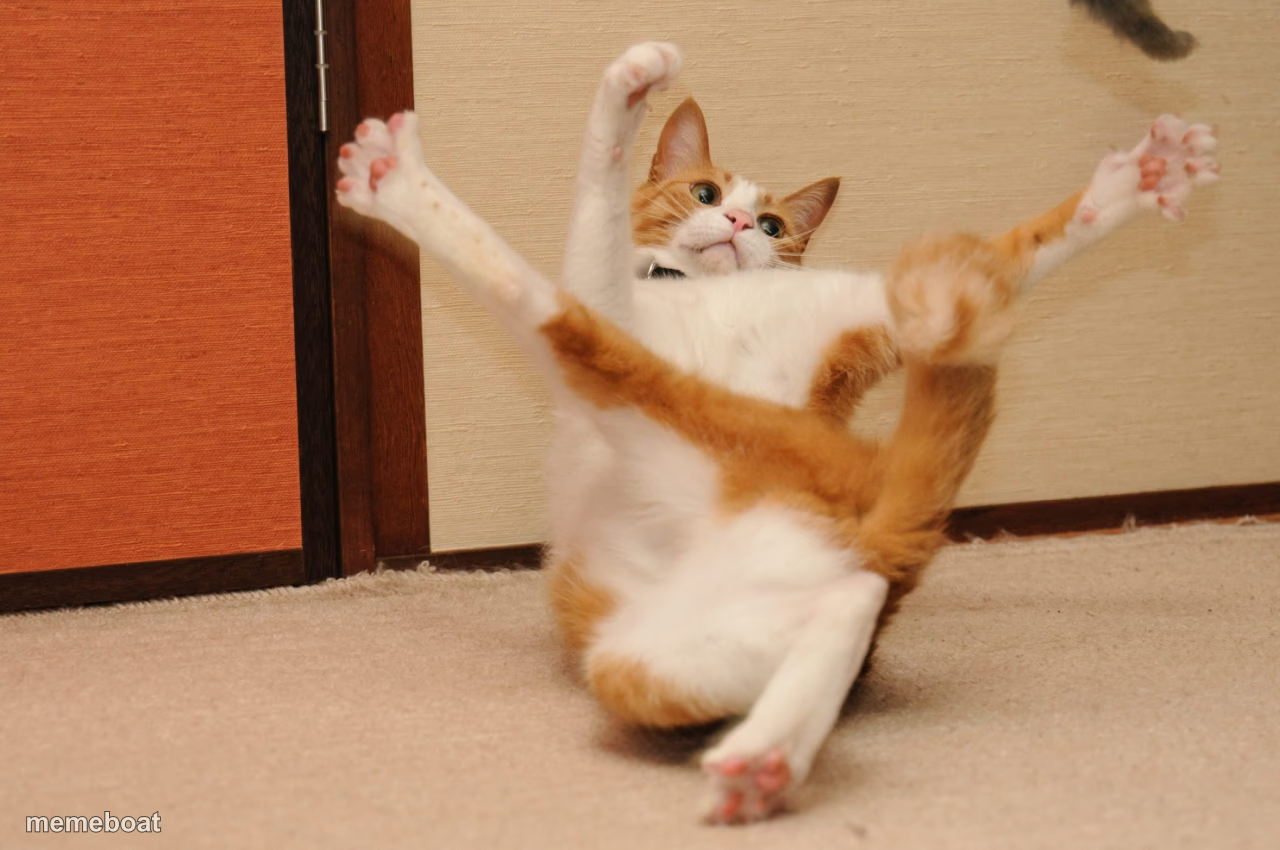
An orange-and-white cat caught mid-fall on its back, paws flailing in total shock. Perfect for overreactions and losing your balance. Caption it free.
Blank Startled Cat Falling meme template
Download the blank Startled Cat Falling template to caption it yourself, or add your text right here in the editor above and download the finished meme.
When to use the Startled Cat Falling meme
- Reacting to shocking news by completely losing your footing
- Getting caught off guard by a sudden loud noise
- The exact moment a plan falls apart
Startled Cat Falling template facts
- Dimensions
- 1280 × 850 px
- Format
- JPG
- Text boxes
- 2
- Added
- 2025
About the Startled Cat Falling meme template
This cat is having the worst possible moment of its life — flipped backward, all four legs in the air, eyes wide with pure betrayal. It's the physical embodiment of getting blindsided by something you absolutely did not see coming.
Popular Startled Cat Falling caption ideas
ME HEARING MY PHONE · BUZZ DURING A MEETING
WHEN THE WIFI DROPS · MID BOSS FIGHT
FINDING OUT IT'S · MONDAY TOMORROW
Templates similar to Startled Cat Falling


Startled Cat Falling meme FAQ
How do I make a Startled Cat Falling meme?
Scroll up to the Startled Cat Falling template, type your caption into the 2 text boxes in the editor above, adjust the font, size and color if you like, then click download. Your finished Startled Cat Falling meme is ready to share in seconds.
Can I use the Startled Cat Falling template for free?
Yes. The Startled Cat Falling template is completely free to use — no signup and no limits on how many memes you create or where you share them.
How do I download my Startled Cat Falling meme?
Click the download button under the editor once your Startled Cat Falling meme looks right. It saves straight to your device as a high-quality PNG or JPEG image.
How do I download the blank Startled Cat Falling template?
Use the "Download blank template" button in the blank Startled Cat Falling template section above to save the original, un-captioned image — handy if you'd rather caption it in another app or keep a copy.