
Top Bingo Meme Generator
Create Your Top Bingo Meme
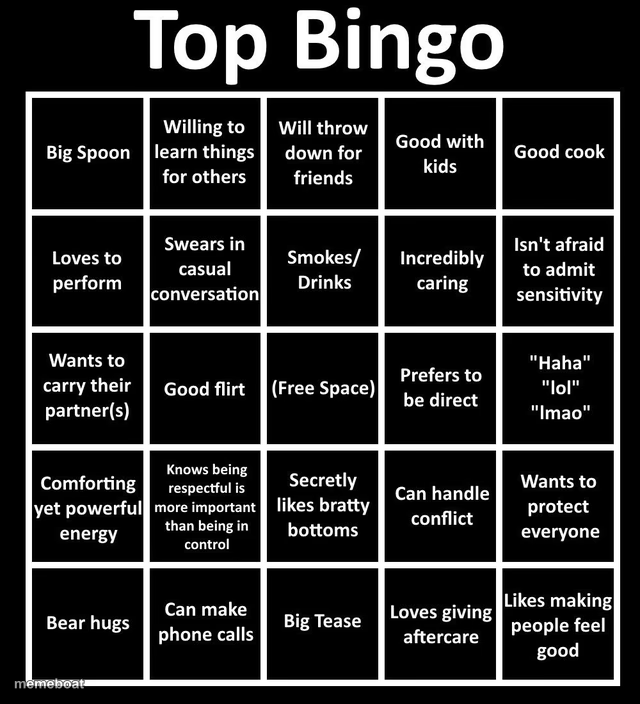
A blank bingo-card template full of 'top' relationship traits — swap the squares to build your own personality bingo card free, no sign-up.
Blank Top Bingo meme template
Download the blank Top Bingo template to caption it yourself, or add your text right here in the editor above and download the finished meme.
When to use the Top Bingo meme
- Roasting a friend group by filling every square with their actual quirks
- Making a 'this describes my situationship' bingo card to send in the group chat
Top Bingo template facts
- Dimensions
- 640 × 704 px
- Format
- PNG
- Added
- 2025
About the Top Bingo meme template
This one's a full bingo card, not a single image joke, and that's exactly why it works so well — it's begging to get filled in with your own set of traits, red flags, green flags, or inside jokes about a specific person. The default squares are all about being a caring, flirty, take-charge partner, but every square is fair game to rewrite.
Use it for personality bingo, friend-group roast cards, dating profile bingo, or 'things my ex definitely was NOT' cards. It's a template that rewards effort — the funnier your custom squares, the better the payoff when someone gets a horizontal line.
Templates similar to Top Bingo


Top Bingo meme FAQ
How do I make a Top Bingo meme?
Scroll up to the Top Bingo template, add your own text boxes in the editor above and type your captions, adjust the font, size and color if you like, then click download. Your finished Top Bingo meme is ready to share in seconds.
Can I use the Top Bingo template for free?
Yes. The Top Bingo template is completely free to use — no signup and no limits on how many memes you create or where you share them.
How do I download my Top Bingo meme?
Click the download button under the editor once your Top Bingo meme looks right. It saves straight to your device as a high-quality PNG or JPEG image.
How do I download the blank Top Bingo template?
Use the "Download blank template" button in the blank Top Bingo template section above to save the original, un-captioned image — handy if you'd rather caption it in another app or keep a copy.