
Too Late Meme Generator
Create Your Too Late Meme
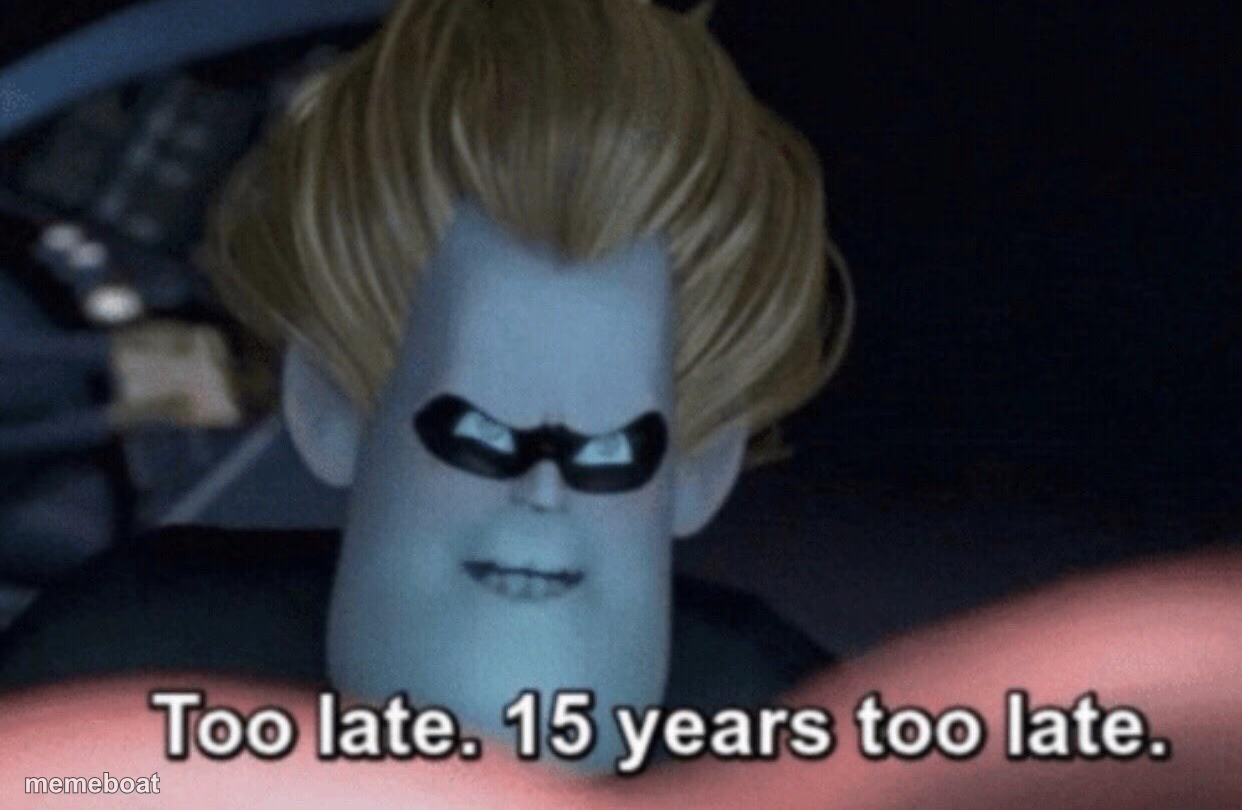
Syndrome from The Incredibles sneering 'too late, 15 years too late' — perfect for delayed comebacks and revenge served way past its prime. Free to caption.
Blank Too Late meme template
Download the blank Too Late template to caption it yourself, or add your text right here in the editor above and download the finished meme.
When to use the Too Late meme
- Finally beating your sibling at a board game after a decade of losing
- Getting an apology text years after you stopped caring
- Your ex liking your Instagram post two years post-breakup
- Winning an argument you lost badly back in high school
Too Late template facts
- Featuring
- Syndrome (The Incredibles)
- Dimensions
- 1242 × 810 px
- Format
- PNG
- Added
- 2025
About the Too Late meme template
Syndrome leans into frame with that villain smirk delivering one of the most quotable lines in Pixar history: 'Too late. 15 years too late.' It's petty, it's smug, and it's exactly the energy you need for a delayed but satisfying comeback.
Swap the number for whatever timeframe fits — this template is built for anyone finally getting their moment after way too long waiting for it. Old grudges, late apologies, revenge served ice cold.
Templates similar to Too Late

Too Late meme FAQ
How do I make a Too Late meme?
Scroll up to the Too Late template, add your own text boxes in the editor above and type your captions, adjust the font, size and color if you like, then click download. Your finished Too Late meme is ready to share in seconds.
Can I use the Too Late template for free?
Yes. The Too Late template is completely free to use — no signup and no limits on how many memes you create or where you share them.
How do I download my Too Late meme?
Click the download button under the editor once your Too Late meme looks right. It saves straight to your device as a high-quality PNG or JPEG image.
How do I download the blank Too Late template?
Use the "Download blank template" button in the blank Too Late template section above to save the original, un-captioned image — handy if you'd rather caption it in another app or keep a copy.