
time to make world war 2 look like a tea party Meme Generator
Create Your time to make world war 2 look like a tea party Meme
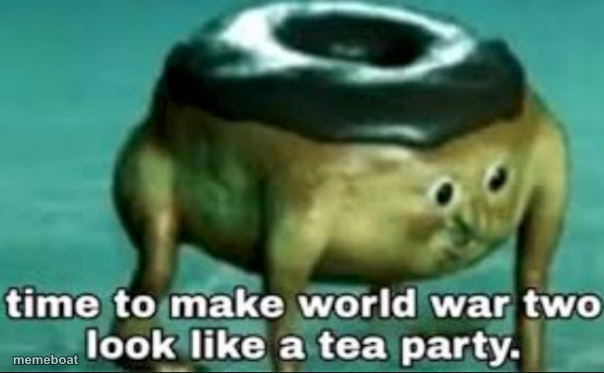
A cursed surreal creature with a chocolate donut for a head on a frog's body — perfect for over-the-top threats and unhinged declarations. Caption it free.
Blank time to make world war 2 look like a tea party meme template
Download the blank time to make world war 2 look like a tea party template to caption it yourself, or add your text right here in the editor above and download the finished meme.
When to use the time to make world war 2 look like a tea party meme
- announcing you're about to overreact to a minor inconvenience
- hyping yourself up before a petty argument with a sibling
- captioning the moment before you reply-all to a work email
time to make world war 2 look like a tea party template facts
- Dimensions
- 604 × 373 px
- Format
- PNG
- Text boxes
- 2
- Added
- 2025
About the time to make world war 2 look like a tea party meme template
Nobody really knows what this thing is. A squat little frog-bodied creature with a glazed chocolate donut standing in for a head, wide-eyed and completely unbothered by how deeply wrong it looks. It first started circulating with the caption "time to make world war two look like a tea party," the kind of absurd overkill line that only works because the image underneath is this unsettling.
That mismatch — dead-serious threat, ridiculous cursed visual — is exactly why it keeps getting reused for any moment you want to announce you're about to go nuclear over something trivial. Drop your own escalation line on it and let the donut head do the rest.
Popular time to make world war 2 look like a tea party caption ideas
someone reheated fish in the office microwave · time to make hr look like a suggestion box
my brother took the last slice · world war three starts in the kitchen tonight
they said 'reply all' by accident · about to make this the most unhinged email thread in company history
Templates similar to time to make world war 2 look like a tea party



time to make world war 2 look like a tea party meme FAQ
How do I make a time to make world war 2 look like a tea party meme?
Scroll up to the time to make world war 2 look like a tea party template, type your caption into the 2 text boxes in the editor above, adjust the font, size and color if you like, then click download. Your finished time to make world war 2 look like a tea party meme is ready to share in seconds.
Can I use the time to make world war 2 look like a tea party template for free?
Yes. The time to make world war 2 look like a tea party template is completely free to use — no signup and no limits on how many memes you create or where you share them.
How do I download my time to make world war 2 look like a tea party meme?
Click the download button under the editor once your time to make world war 2 look like a tea party meme looks right. It saves straight to your device as a high-quality PNG or JPEG image.
How do I download the blank time to make world war 2 look like a tea party template?
Use the "Download blank template" button in the blank time to make world war 2 look like a tea party template section above to save the original, un-captioned image — handy if you'd rather caption it in another app or keep a copy.