
Tim Walz Meme Generator
Create Your Tim Walz Meme
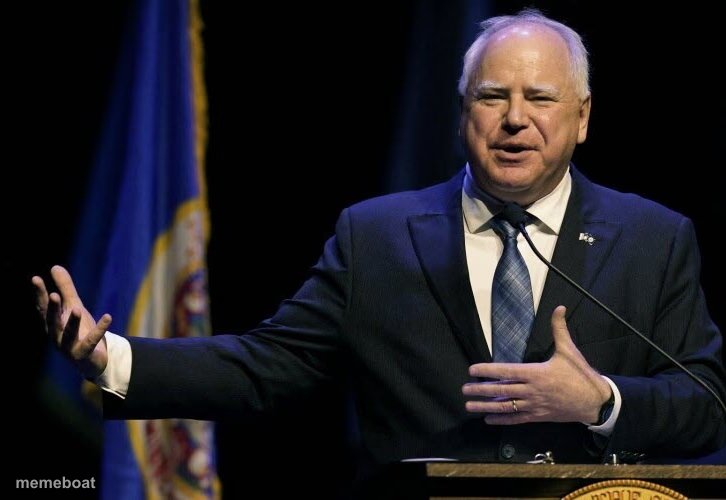
Tim Walz gestures mid-speech at a podium — the friendly, animated 'let me explain something' pose. Caption it and download free.
Blank Tim Walz meme template
Download the blank Tim Walz template to caption it yourself, or add your text right here in the editor above and download the finished meme.
When to use the Tim Walz meme
- Explaining why you're right about a minor argument
- A dad giving unsolicited advice at a family gathering
- Someone over-explaining a simple concept at work
- Trying to sell your friends on a questionable plan
Tim Walz template facts
- Featuring
- Tim Walz
- Dimensions
- 726 × 500 px
- Format
- PNG
- Text boxes
- 1
- Added
- 2025
About the Tim Walz meme template
Hands out, mid-sentence, clearly explaining something with the enthusiasm of a guy who genuinely believes what he's saying — this is Tim Walz doing what he does best, talking with his whole body.
Good for captioning any earnest explanation, dad-energy pep talk, or well-meaning but slightly over-explained point. Works for political jokes or just anyone who talks with their hands way too much.
Popular Tim Walz caption ideas
LET ME BE VERY CLEAR ABOUT SOMETHING
SO HEAR ME OUT ON THIS ONE
AS I WAS SAYING, FOLKS





Tim Walz meme FAQ
How do I make a Tim Walz meme?
Scroll up to the Tim Walz template, type your caption into the text box in the editor above, adjust the font, size and color if you like, then click download. Your finished Tim Walz meme is ready to share in seconds.
Can I use the Tim Walz template for free?
Yes. The Tim Walz template is completely free to use — no signup and no limits on how many memes you create or where you share them.
How do I download my Tim Walz meme?
Click the download button under the editor once your Tim Walz meme looks right. It saves straight to your device as a high-quality PNG or JPEG image.
How do I download the blank Tim Walz template?
Use the "Download blank template" button in the blank Tim Walz template section above to save the original, un-captioned image — handy if you'd rather caption it in another app or keep a copy.