
the horror Meme Generator
Create Your the horror Meme

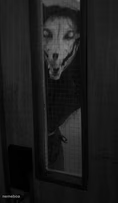
A barely-visible face staring out of pitch darkness — creepy, low-res, and perfect for horror-tinged reactions. Caption and download free.
Blank the horror meme template
Download the blank the horror template to caption it yourself, or add your text right here in the editor above and download the finished meme.
When to use the the horror meme
- Reacting to something genuinely terrifying you just saw online
- Setting up a fake horror-movie jump scare joke
- That 3am feeling when you hear a noise in the house
- Captioning a low-quality security cam style screenshot
the horror template facts
- Dimensions
- 1280 × 720 px
- Format
- JPG
- Text boxes
- 2
- Added
- 2026
About the the horror meme template
You can barely make out a face in the dark, eyes wide, staring straight into the camera like something out of a found-footage horror movie. It's grainy, it's unsettling, and it works exactly because you can't quite tell what's going on.
Popular the horror caption ideas
ME WHEN I’M IN A DARK ROOM
me checking if the door is locked · for the fifth time tonight
when you hear your name whispered · and you live alone
the group chat at 2am · 'guys I think someone's outside'
the horror meme FAQ
How do I make a the horror meme?
Scroll up to the the horror template, type your caption into the 2 text boxes in the editor above, adjust the font, size and color if you like, then click download. Your finished the horror meme is ready to share in seconds.
Can I use the the horror template for free?
Yes. The the horror template is completely free to use — no signup and no limits on how many memes you create or where you share them.
How do I download my the horror meme?
Click the download button under the editor once your the horror meme looks right. It saves straight to your device as a high-quality PNG or JPEG image.
How do I download the blank the horror template?
Use the "Download blank template" button in the blank the horror template section above to save the original, un-captioned image — handy if you'd rather caption it in another app or keep a copy.