
the 10 waifus Meme Generator
Create Your the 10 waifus Meme
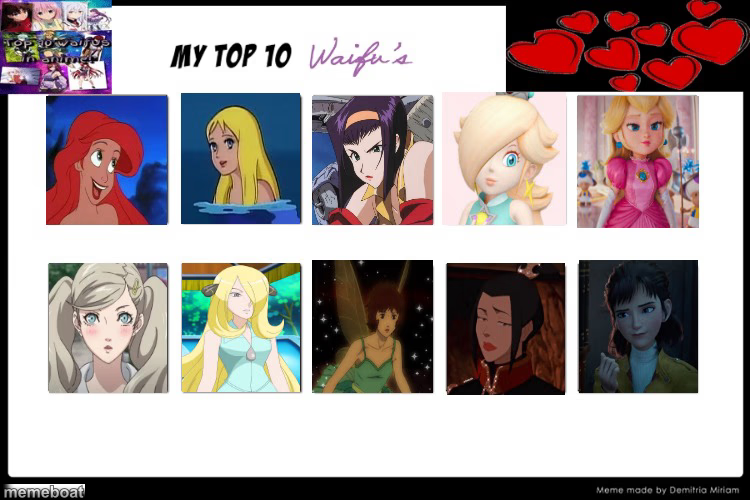
The classic 'My Top 10 Waifus' grid template for ranking your favorite animated female characters. Fill it in and download free, no sign-up.
Blank the 10 waifus meme template
Download the blank the 10 waifus template to caption it yourself, or add your text right here in the editor above and download the finished meme.
When to use the the 10 waifus meme
- Ranking your top ten fictional crushes from anime or cartoons
- Trolling friends by filling every slot with the same character
- Making a joke list of your top ten favorite snacks instead of characters
the 10 waifus template facts
- Dimensions
- 750 × 500 px
- Format
- JPG
- Added
- 2025
About the the 10 waifus meme template
The internet's go-to format for ranking fictional crushes: ten empty slots across two rows under a hearts banner, ready for you to drop in your picks from anime, cartoons, or games. It's basically a character sheet for your taste in fictional people.
People use it to flex genuinely deep cuts, troll their friends with intentionally bad picks, or just have an excuse to talk about their favorite shows. Swap in screenshots and let the ranking speak for itself.
Templates similar to the 10 waifus



the 10 waifus meme FAQ
How do I make a the 10 waifus meme?
Scroll up to the the 10 waifus template, add your own text boxes in the editor above and type your captions, adjust the font, size and color if you like, then click download. Your finished the 10 waifus meme is ready to share in seconds.
Can I use the the 10 waifus template for free?
Yes. The the 10 waifus template is completely free to use — no signup and no limits on how many memes you create or where you share them.
How do I download my the 10 waifus meme?
Click the download button under the editor once your the 10 waifus meme looks right. It saves straight to your device as a high-quality PNG or JPEG image.
How do I download the blank the 10 waifus template?
Use the "Download blank template" button in the blank the 10 waifus template section above to save the original, un-captioned image — handy if you'd rather caption it in another app or keep a copy.