
Teacher Meme Meme Generator
Create Your Teacher Meme Meme
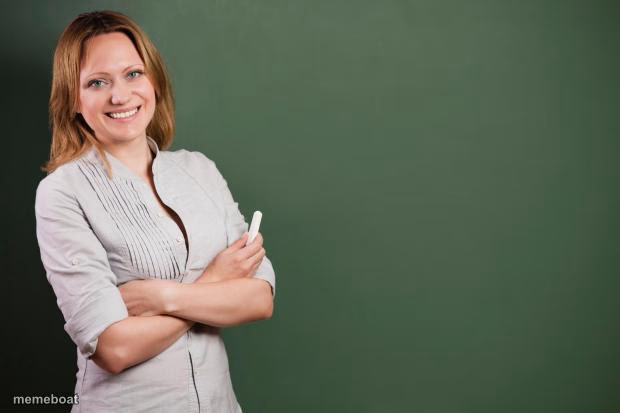
A confident teacher standing in front of a blank chalkboard, arms crossed and smiling. Great for lesson, life-lesson, or 'today's topic' jokes — caption free.
Blank Teacher Meme meme template
Download the blank Teacher Meme template to caption it yourself, or add your text right here in the editor above and download the finished meme.
When to use the Teacher Meme meme
- Announcing today's lesson or topic in mock-classroom style
- Delivering a sarcastic 'life lesson' nobody asked for
- Setting up a fake syllabus or rule list on the blank board
Teacher Meme template facts
- Dimensions
- 620 × 413 px
- Format
- JPG
- Text boxes
- 1
- Added
- 2025
About the Teacher Meme meme template
This teacher has her chalk ready and that 'I've been doing this for 20 years and nothing surprises me anymore' energy. The empty green board behind her is basically begging for a syllabus, a life lesson, or something completely unhinged written across it.
Popular Teacher Meme caption ideas
HOW TO FIX SOMEONE: · 1. YOU CAN'T
Today's lesson: why you're still single
Pop quiz: did you actually read the group chat or just say 'k'?
Class, today we're learning that adulting is a scam
Templates similar to Teacher Meme

Teacher Meme meme FAQ
How do I make a Teacher Meme meme?
Scroll up to the Teacher Meme template, type your caption into the text box in the editor above, adjust the font, size and color if you like, then click download. Your finished Teacher Meme meme is ready to share in seconds.
Can I use the Teacher Meme template for free?
Yes. The Teacher Meme template is completely free to use — no signup and no limits on how many memes you create or where you share them.
How do I download my Teacher Meme meme?
Click the download button under the editor once your Teacher Meme meme looks right. It saves straight to your device as a high-quality PNG or JPEG image.
How do I download the blank Teacher Meme template?
Use the "Download blank template" button in the blank Teacher Meme template section above to save the original, un-captioned image — handy if you'd rather caption it in another app or keep a copy.