
Spongebob Trash Startle Meme Generator
Create Your Spongebob Trash Startle Meme
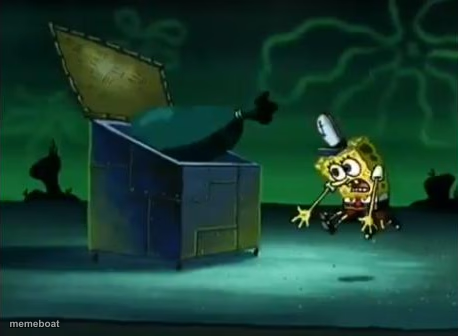
SpongeBob jumps back startled as he opens a dumpster at night — perfect for jokes about opening something you immediately regret. Caption free on Memeboat.
Blank Spongebob Trash Startle meme template
Download the blank Spongebob Trash Startle template to caption it yourself, or add your text right here in the editor above and download the finished meme.
When to use the Spongebob Trash Startle meme
- Opening a fridge you forgot to clean out weeks ago
- Reading the reply-all email chain you got dragged into
Spongebob Trash Startle template facts
- Featuring
- SpongeBob SquarePants
- Dimensions
- 458 × 336 px
- Format
- PNG
- Added
- 2025
About the Spongebob Trash Startle meme template
Dark, eerie night scene: SpongeBob cracks open a dumpster lid and instantly recoils in shock, arms flailing. Whatever's in there, he was not ready.
Use it for that split-second of regret right after you open an email, a group chat, a fridge, or a text you shouldn't have read. The jump-scare energy sells itself.
Popular Spongebob Trash Startle caption ideas
MY MEMES · ME
Templates similar to Spongebob Trash Startle

Spongebob Trash Startle meme FAQ
How do I make a Spongebob Trash Startle meme?
Scroll up to the Spongebob Trash Startle template, add your own text boxes in the editor above and type your captions, adjust the font, size and color if you like, then click download. Your finished Spongebob Trash Startle meme is ready to share in seconds.
Can I use the Spongebob Trash Startle template for free?
Yes. The Spongebob Trash Startle template is completely free to use — no signup and no limits on how many memes you create or where you share them.
How do I download my Spongebob Trash Startle meme?
Click the download button under the editor once your Spongebob Trash Startle meme looks right. It saves straight to your device as a high-quality PNG or JPEG image.
How do I download the blank Spongebob Trash Startle template?
Use the "Download blank template" button in the blank Spongebob Trash Startle template section above to save the original, un-captioned image — handy if you'd rather caption it in another app or keep a copy.