
Tahvo Explores Meme Generator
Create Your Tahvo Explores Meme

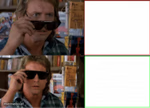
A sharp-eyed white wolf character with sunglasses pushed up, smirking at the sky. Add your caption and download this free meme template.
Blank Tahvo Explores meme template
Download the blank Tahvo Explores template to caption it yourself, or add your text right here in the editor above and download the finished meme.
When to use the Tahvo Explores meme
- Reacting to a plan that's clearly about to go sideways
- That moment you catch someone in an obvious lie
- When chaos erupts and you're strangely calm about it
Tahvo Explores template facts
- Dimensions
- 1110 × 500 px
- Format
- PNG
- Text boxes
- 2
- Added
- 2025
About the Tahvo Explores meme template
This one's a smug white wolf-fox creature with orange eyes, sunglasses shoved up on its head, and a smirk that says it already knows the punchline. Little debris particles trail behind it against a clear blue sky, like it just dodged something or is mid-reaction to nonsense.
The big blank panel next to it is built for a gut reaction, a plot twist, or whatever chaos just entered the chat. Drop your text in and download it free.
Popular Tahvo Explores caption ideas
RECTANGLE SUNGLASSES ARE AWESOME · REQUIRED FILLER TEXT
ME WATCHING THE PLAN FALL APART · STILL THINK IT'S GOING GREAT
WHEN THE WIFI DROPS · MID BOSS FIGHT
SAW THE GROUP CHAT NOTIFICATION · ALREADY KNOW IT'S DRAMA







Tahvo Explores meme FAQ
How do I make a Tahvo Explores meme?
Scroll up to the Tahvo Explores template, type your caption into the 2 text boxes in the editor above, adjust the font, size and color if you like, then click download. Your finished Tahvo Explores meme is ready to share in seconds.
Can I use the Tahvo Explores template for free?
Yes. The Tahvo Explores template is completely free to use — no signup and no limits on how many memes you create or where you share them.
How do I download my Tahvo Explores meme?
Click the download button under the editor once your Tahvo Explores meme looks right. It saves straight to your device as a high-quality PNG or JPEG image.
How do I download the blank Tahvo Explores template?
Use the "Download blank template" button in the blank Tahvo Explores template section above to save the original, un-captioned image — handy if you'd rather caption it in another app or keep a copy.