
Suspicious Tom Meme Generator
Create Your Suspicious Tom Meme
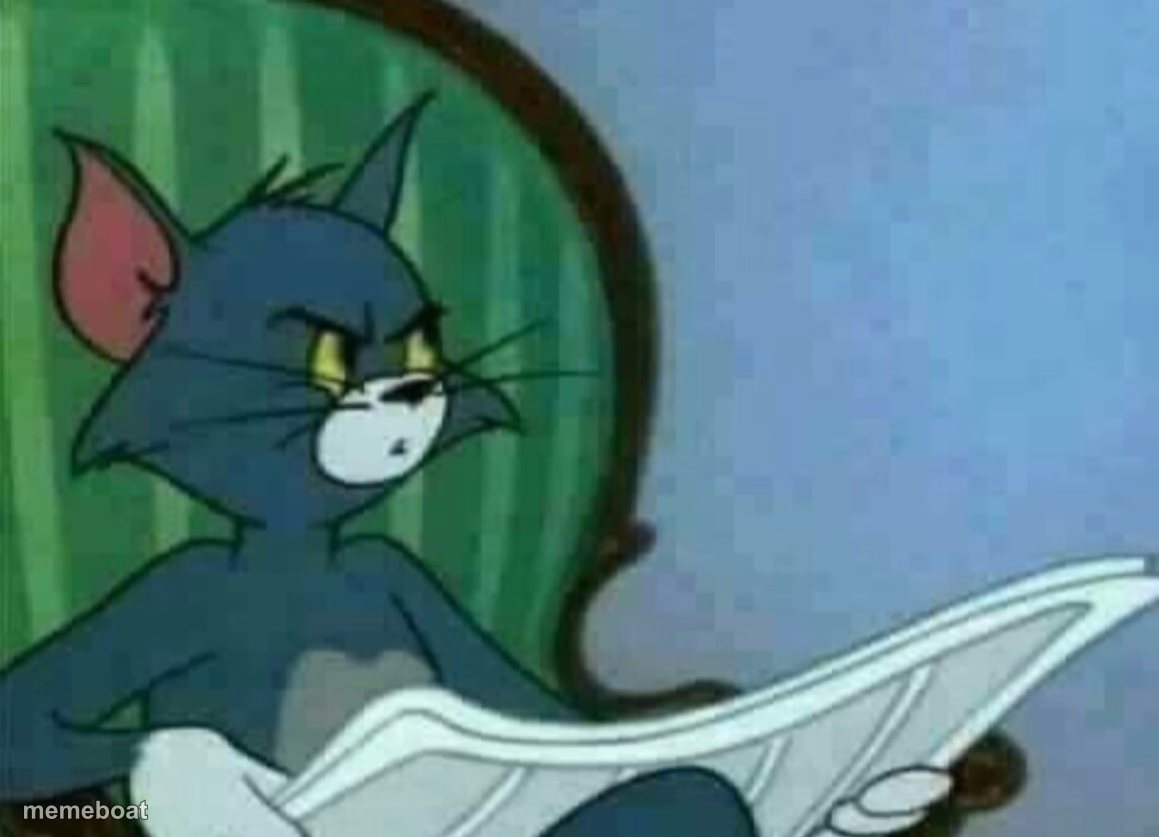
Tom the cat side-eyeing over his newspaper with pure suspicion — the go-to face for 'wait, something's off here' moments. Free to caption and download.
Blank Suspicious Tom meme template
Download the blank Suspicious Tom template to caption it yourself, or add your text right here in the editor above and download the finished meme.
When to use the Suspicious Tom meme
- Catching a subtle lie in real time but staying quiet about it
- The face you make when your partner says 'nothing's wrong'
- Side-eyeing a friend's suspiciously specific alibi
Suspicious Tom template facts
- Featuring
- Tom (Tom and Jerry)
- Dimensions
- 1159 × 837 px
- Format
- JPG
- Added
- 2025
About the Suspicious Tom meme template
Tom's sitting there reading his paper like a proper gentleman cat, except his eyes are doing all the talking — narrowed, judgmental, clearly onto something. It's the face of a guy who just heard a suspicious noise from the kitchen.
This one's built for any moment you're pretending to be relaxed while internally cataloging every red flag. Nosy neighbor energy, 'wait did you eat my leftovers' energy, classic sitcom side-eye.
Templates similar to Suspicious Tom

Suspicious Tom meme FAQ
How do I make a Suspicious Tom meme?
Scroll up to the Suspicious Tom template, add your own text boxes in the editor above and type your captions, adjust the font, size and color if you like, then click download. Your finished Suspicious Tom meme is ready to share in seconds.
Can I use the Suspicious Tom template for free?
Yes. The Suspicious Tom template is completely free to use — no signup and no limits on how many memes you create or where you share them.
How do I download my Suspicious Tom meme?
Click the download button under the editor once your Suspicious Tom meme looks right. It saves straight to your device as a high-quality PNG or JPEG image.
How do I download the blank Suspicious Tom template?
Use the "Download blank template" button in the blank Suspicious Tom template section above to save the original, un-captioned image — handy if you'd rather caption it in another app or keep a copy.