
suprised Meme Generator
Create Your suprised Meme

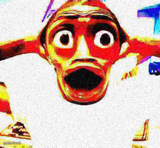
A guy in a top hat and headphones caught mid-shock, mouth wide open. Perfect for reacting to news you did NOT see coming. Caption it free.
Blank suprised meme template
Download the blank suprised template to caption it yourself, or add your text right here in the editor above and download the finished meme.
When to use the suprised meme
- Hearing the bassline drop way harder than expected
- Finding out the price of something ridiculous
- When the group chat sends the most unhinged text
suprised template facts
- Dimensions
- 86 × 81 px
- Format
- PNG
- Text boxes
- 2
- Added
- 2025
About the suprised meme template
This low-res gem shows a man in a top hat and headphones with his jaw dropped wide open, like he just heard something absolutely unhinged through his cans. Nobody's quite sure who he is or where the clip came from, but that face says everything you need it to.
Use it whenever the news, the group chat, or the DJ set completely blindsides you. Add your own top and bottom text and it's ready to download free, no sign-up required.
Popular suprised caption ideas
YOO 200 FOLLOWERS LETS GOOO · PARTY IN THE COMMENTS
ME LISTENING TO THE NEW ALBUM · AND IT'S ACTUALLY GOOD
WHEN THE DJ DROPS THE BEAT · AND YOUR SOUL LEAVES YOUR BODY
FINDS OUT RENT WENT UP AGAIN · SIR THIS IS A TOP HAT
suprised meme FAQ
How do I make a suprised meme?
Scroll up to the suprised template, type your caption into the 2 text boxes in the editor above, adjust the font, size and color if you like, then click download. Your finished suprised meme is ready to share in seconds.
Can I use the suprised template for free?
Yes. The suprised template is completely free to use — no signup and no limits on how many memes you create or where you share them.
How do I download my suprised meme?
Click the download button under the editor once your suprised meme looks right. It saves straight to your device as a high-quality PNG or JPEG image.
How do I download the blank suprised template?
Use the "Download blank template" button in the blank suprised template section above to save the original, un-captioned image — handy if you'd rather caption it in another app or keep a copy.