
Superman Screaming Meme Generator
Create Your Superman Screaming Meme
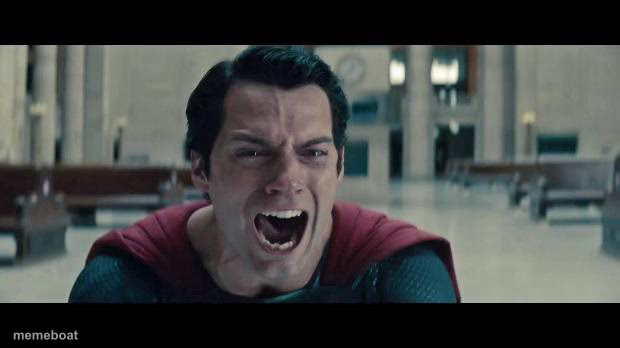
Superman letting out a raw, anguished scream in a train station. Perfect for grief, rage, or losing it completely over something big or small. Caption and download free.
Blank Superman Screaming meme template
Download the blank Superman Screaming template to caption it yourself, or add your text right here in the editor above and download the finished meme.
When to use the Superman Screaming meme
- Finding out the WiFi is down mid-download
- Watching your team blow a lead in the final minute
Superman Screaming template facts
- Featuring
- Superman (Man of Steel)
- Dimensions
- 620 × 348 px
- Format
- JPG
- Added
- 2025
About the Superman Screaming meme template
Even the Man of Steel has a breaking point, and this is it — head thrown back, mouth wide open, screaming like the whole world just ended. It's pure unfiltered devastation with superhero-level intensity.
Great for reacting to genuinely terrible news, or hilariously overreacting to something small, like a WiFi outage or your team losing in overtime.
Popular Superman Screaming caption ideas
FCSB WHEN · ITS 2003-2017 HONORS ARE SCRAPPED
Templates similar to Superman Screaming



Superman Screaming meme FAQ
How do I make a Superman Screaming meme?
Scroll up to the Superman Screaming template, add your own text boxes in the editor above and type your captions, adjust the font, size and color if you like, then click download. Your finished Superman Screaming meme is ready to share in seconds.
Can I use the Superman Screaming template for free?
Yes. The Superman Screaming template is completely free to use — no signup and no limits on how many memes you create or where you share them.
How do I download my Superman Screaming meme?
Click the download button under the editor once your Superman Screaming meme looks right. It saves straight to your device as a high-quality PNG or JPEG image.
How do I download the blank Superman Screaming template?
Use the "Download blank template" button in the blank Superman Screaming template section above to save the original, un-captioned image — handy if you'd rather caption it in another app or keep a copy.