
Supachok Explain Meme Generator
Create Your Supachok Explain Meme
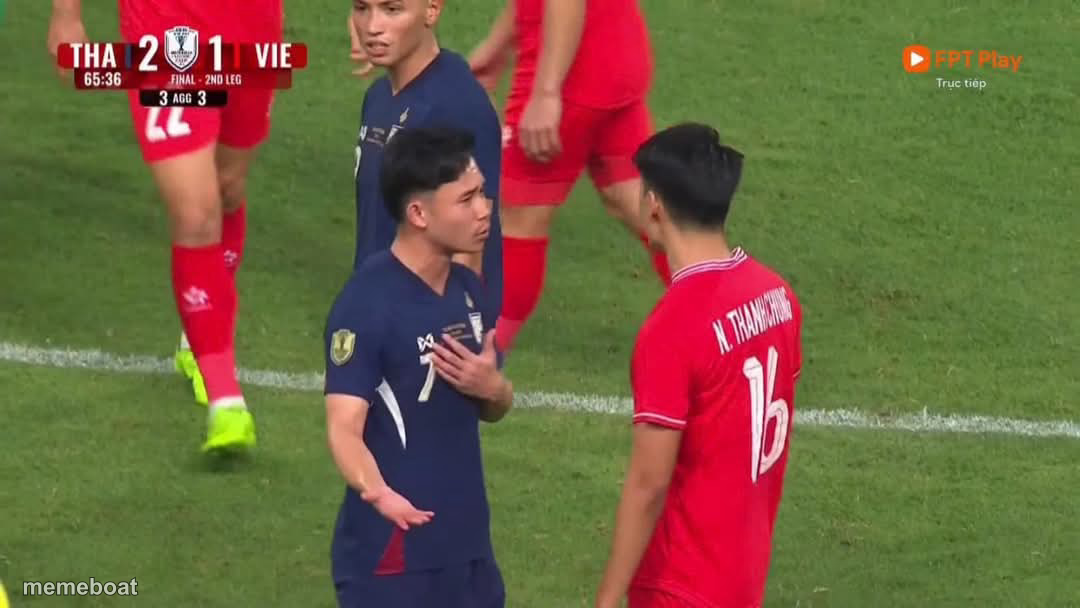
Thai footballer caught mid-argument with a Vietnamese opponent after a controversial goal, hand on chest defending himself. Caption it, download free.
Blank Supachok Explain meme template
Download the blank Supachok Explain template to caption it yourself, or add your text right here in the editor above and download the finished meme.
When to use the Supachok Explain meme
- when you get caught cheating and immediately start explaining yourself
- arguing with the ref after a blatant handball
- defending an obviously shady move like it was an accident
- explaining to your group chat why you actually deserved the win
Supachok Explain template facts
- Dimensions
- 1080 × 608 px
- Format
- JPG
- Text boxes
- 2
- Added
- 2025
About the Supachok Explain meme template
It's the scoreboard that gives it away: Thailand 2, Vietnam 1, extra time in a two-leg final. A Thai player in blue clutches his chest, giving his best "I did nothing wrong" defense to a red-shirted Vietnamese opponent squaring up on him. This is Supachok mid-explanation, and everyone in the stadium already knows he's guilty of something.
Use this one anytime someone gets caught red-handed and immediately launches into a passionate, over-the-top defense. Perfect for the friend who fouls you in FIFA and still argues the call, the coworker explaining why the numbers are "basically" right, or anyone insisting their obviously sketchy move was totally fine, actually.
Popular Supachok Explain caption ideas
me: handles the ball into the goal · also me: "it was an accident, I swear"
when the whole stadium saw it · but you still have to try
explaining to HR · why the numbers look like that
Templates similar to Supachok Explain





Supachok Explain meme FAQ
How do I make a Supachok Explain meme?
Scroll up to the Supachok Explain template, type your caption into the 2 text boxes in the editor above, adjust the font, size and color if you like, then click download. Your finished Supachok Explain meme is ready to share in seconds.
Can I use the Supachok Explain template for free?
Yes. The Supachok Explain template is completely free to use — no signup and no limits on how many memes you create or where you share them.
How do I download my Supachok Explain meme?
Click the download button under the editor once your Supachok Explain meme looks right. It saves straight to your device as a high-quality PNG or JPEG image.
How do I download the blank Supachok Explain template?
Use the "Download blank template" button in the blank Supachok Explain template section above to save the original, un-captioned image — handy if you'd rather caption it in another app or keep a copy.