
Stretch Meme Generator
Create Your Stretch Meme
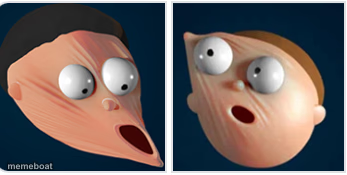
A 3D-rendered face split into two stretched, wide-eyed panels — perfect for reacting to something that warped your brain. Caption it free.
Blank Stretch meme template
Download the blank Stretch template to caption it yourself, or add your text right here in the editor above and download the finished meme.
When to use the Stretch meme
- When someone drops a wild plot twist mid-conversation
- Reacting to a text message that makes zero sense
- The face you make hearing your rent went up again
Stretch template facts
- Dimensions
- 347 × 175 px
- Format
- JPG
- Text boxes
- 2
- Added
- 2025
About the Stretch meme template
Two side-by-side shots of the same rubbery 3D face, eyes bugged out and jaw hanging open like it just got yanked and stretched by an invisible hand. It's the exact look of a brain trying to process something it wasn't ready for.
Use it whenever a plot twist, a bad take, or a group chat message physically distorts your face in real time. No signup, just caption it and download.
Popular Stretch caption ideas
Me reading the group chat · at 2am
When they say 'we need to talk' · brain.exe stops responding
Boss: quick question · Me, already stretched thin
Templates similar to Stretch


Stretch meme FAQ
How do I make a Stretch meme?
Scroll up to the Stretch template, type your caption into the 2 text boxes in the editor above, adjust the font, size and color if you like, then click download. Your finished Stretch meme is ready to share in seconds.
Can I use the Stretch template for free?
Yes. The Stretch template is completely free to use — no signup and no limits on how many memes you create or where you share them.
How do I download my Stretch meme?
Click the download button under the editor once your Stretch meme looks right. It saves straight to your device as a high-quality PNG or JPEG image.
How do I download the blank Stretch template?
Use the "Download blank template" button in the blank Stretch template section above to save the original, un-captioned image — handy if you'd rather caption it in another app or keep a copy.