
Stonetoss immigration Meme Generator
Create Your Stonetoss immigration Meme
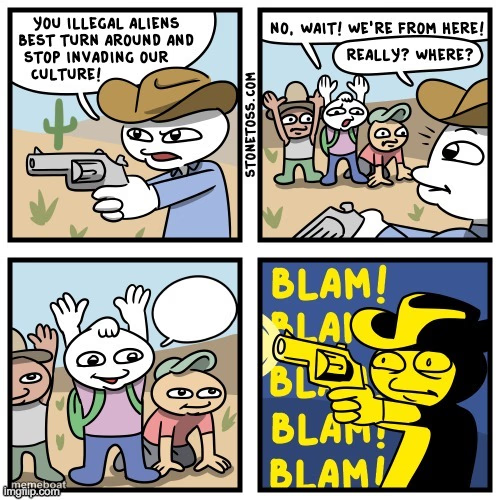
A four-panel comic strip about a hypocritical confrontation that ends in a punchline twist. Caption your own version and download it free.
Blank Stonetoss immigration meme template
Download the blank Stonetoss immigration template to caption it yourself, or add your text right here in the editor above and download the finished meme.
When to use the Stonetoss immigration meme
- Setting up a hypocrisy or double-standard joke with a twist reveal
- Building any 'wait, actually...' plot twist across panels
- Escalating a small disagreement into a chaotic punchline
Stonetoss immigration template facts
- Featuring
- Stonetoss comic (Stonetoss webcomic)
- Dimensions
- 500 × 500 px
- Format
- PNG
- Added
- 2025
About the Stonetoss immigration meme template
A classic four-panel setup: a tense standoff, an unexpected reveal, and a twist ending that flips the whole situation on its head. The blank panels are built for setup-reveal-punchline jokes where panel four completely reframes what you thought was happening.
Popular Stonetoss immigration caption ideas
FLORIDA · ME ASF
Templates similar to Stonetoss immigration




Stonetoss immigration meme FAQ
How do I make a Stonetoss immigration meme?
Scroll up to the Stonetoss immigration template, add your own text boxes in the editor above and type your captions, adjust the font, size and color if you like, then click download. Your finished Stonetoss immigration meme is ready to share in seconds.
Can I use the Stonetoss immigration template for free?
Yes. The Stonetoss immigration template is completely free to use — no signup and no limits on how many memes you create or where you share them.
How do I download my Stonetoss immigration meme?
Click the download button under the editor once your Stonetoss immigration meme looks right. It saves straight to your device as a high-quality PNG or JPEG image.
How do I download the blank Stonetoss immigration template?
Use the "Download blank template" button in the blank Stonetoss immigration template section above to save the original, un-captioned image — handy if you'd rather caption it in another app or keep a copy.