
Stock Crash Meme Generator
Create Your Stock Crash Meme

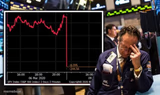
A stock chart climbing high then crashing off a cliff — the universal symbol of everything going wrong fast. Caption it free and download instantly.
Blank Stock Crash meme template
Download the blank Stock Crash template to caption it yourself, or add your text right here in the editor above and download the finished meme.
When to use the Stock Crash meme
- Your crypto portfolio after one bad news cycle
- Your motivation levels throughout the week
- A relationship going great until it really isn't
- Your energy from Friday night to Monday morning
Stock Crash template facts
- Dimensions
- 660 × 640 px
- Format
- JPG
- Text boxes
- 1
- Added
- 2025
About the Stock Crash meme template
This is the chart every investor has nightmares about: a nice steady climb up top, then a brutal red nosedive straight off the edge. Simple, brutal, and instantly readable by anyone who's ever watched a number go the wrong way.
Use it for crypto losses, bad decisions, motivation dying mid-week, or literally any situation that started strong and ended in a crater.
Popular Stock Crash caption ideas
my will to work this week
my bank account after one Amazon order
my crypto portfolio: before I bought, after I bought


Stock Crash meme FAQ
How do I make a Stock Crash meme?
Scroll up to the Stock Crash template, type your caption into the text box in the editor above, adjust the font, size and color if you like, then click download. Your finished Stock Crash meme is ready to share in seconds.
Can I use the Stock Crash template for free?
Yes. The Stock Crash template is completely free to use — no signup and no limits on how many memes you create or where you share them.
How do I download my Stock Crash meme?
Click the download button under the editor once your Stock Crash meme looks right. It saves straight to your device as a high-quality PNG or JPEG image.
How do I download the blank Stock Crash template?
Use the "Download blank template" button in the blank Stock Crash template section above to save the original, un-captioned image — handy if you'd rather caption it in another app or keep a copy.