
Squinting Squidward Meme Generator
Create Your Squinting Squidward Meme
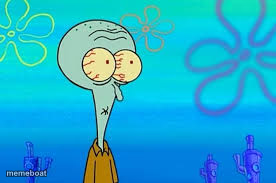
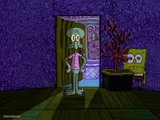
Squidward scrunching his face into a squint, unable to believe what he's seeing. Ideal for disbelief and side-eye reactions — caption it free.
Blank Squinting Squidward meme template
Download the blank Squinting Squidward template to caption it yourself, or add your text right here in the editor above and download the finished meme.
When to use the Squinting Squidward meme
- Reading a text that makes absolutely no sense
- Watching someone confidently say something wrong
- Trying to process a plot twist that came out of nowhere
- Seeing the price tag on something you didn't expect
Squinting Squidward template facts
- Featuring
- Squidward Tentacles (SpongeBob SquarePants)
- Dimensions
- 276 × 183 px
- Format
- PNG
- Added
- 2025
About the Squinting Squidward meme template
Squidward's whole face just folds in on itself here, eyes squeezed nearly shut like he's trying to physically block out whatever nonsense is happening in front of him. It's disbelief, disgust, and secondhand embarrassment all in one squint.
Templates similar to Squinting Squidward
Squinting Squidward meme FAQ
How do I make a Squinting Squidward meme?
Scroll up to the Squinting Squidward template, add your own text boxes in the editor above and type your captions, adjust the font, size and color if you like, then click download. Your finished Squinting Squidward meme is ready to share in seconds.
Can I use the Squinting Squidward template for free?
Yes. The Squinting Squidward template is completely free to use — no signup and no limits on how many memes you create or where you share them.
How do I download my Squinting Squidward meme?
Click the download button under the editor once your Squinting Squidward meme looks right. It saves straight to your device as a high-quality PNG or JPEG image.
How do I download the blank Squinting Squidward template?
Use the "Download blank template" button in the blank Squinting Squidward template section above to save the original, un-captioned image — handy if you'd rather caption it in another app or keep a copy.