
Squidward Staring Out Meme Generator
Create Your Squidward Staring Out Meme
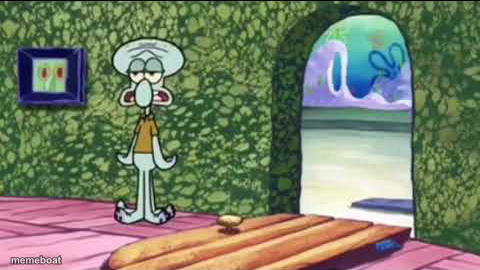
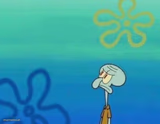
Squidward standing alone in his hallway, staring blankly out the open door at the ocean — the ultimate "done with everyone" reaction template. Free to caption.
Blank Squidward Staring Out meme template
Download the blank Squidward Staring Out template to caption it yourself, or add your text right here in the editor above and download the finished meme.
When to use the Squidward Staring Out meme
- Staring blankly after hearing terrible news at work
- Zoning out mid-conversation because you stopped caring
- That thousand-yard stare after a group chat goes off the rails
Squidward Staring Out template facts
- Featuring
- Squidward Tentacles (SpongeBob SquarePants)
- Dimensions
- 480 × 270 px
- Format
- PNG
- Added
- 2025
About the Squidward Staring Out meme template
Squidward just stands there in that empty green hallway, staring out at the water like he's contemplating every decision that led him to this exact hallway at this exact moment. No words needed, just pure existential exhaustion.
Templates similar to Squidward Staring Out
Squidward Staring Out meme FAQ
How do I make a Squidward Staring Out meme?
Scroll up to the Squidward Staring Out template, add your own text boxes in the editor above and type your captions, adjust the font, size and color if you like, then click download. Your finished Squidward Staring Out meme is ready to share in seconds.
Can I use the Squidward Staring Out template for free?
Yes. The Squidward Staring Out template is completely free to use — no signup and no limits on how many memes you create or where you share them.
How do I download my Squidward Staring Out meme?
Click the download button under the editor once your Squidward Staring Out meme looks right. It saves straight to your device as a high-quality PNG or JPEG image.
How do I download the blank Squidward Staring Out template?
Use the "Download blank template" button in the blank Squidward Staring Out template section above to save the original, un-captioned image — handy if you'd rather caption it in another app or keep a copy.