
Spongebob Curious Grin Meme Generator
Create Your Spongebob Curious Grin Meme
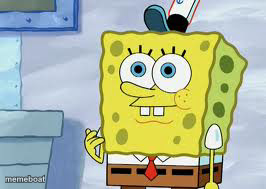
SpongeBob giving that wide-eyed, mischievous grin — perfect for calling out a friend's terrible idea or reacting to workplace nonsense. Caption and download free.
Blank Spongebob Curious Grin meme template
Download the blank Spongebob Curious Grin template to caption it yourself, or add your text right here in the editor above and download the finished meme.
When to use the Spongebob Curious Grin meme
- Reacting when a coworker's terrible idea somehow works
- That face when your friend says 'trust me' before doing something chaotic
- Responding to gossip with barely contained excitement
Spongebob Curious Grin template facts
- Featuring
- SpongeBob SquarePants
- Dimensions
- 266 × 189 px
- Format
- JPG
- Text boxes
- 1
- Added
- 2025
About the Spongebob Curious Grin meme template
That close-up SpongeBob face where he's got the goofy buck-toothed grin and the eyes that say 'I know something you don't.' It's the reaction shot you pull out when someone just said something unhinged and you want your face to do the talking.
Works great for playful callouts, 'wait, what?' moments, or just captioning the dumbest idea someone had that actually worked. Low effort, high payoff — classic SpongeBob energy.
Popular Spongebob Curious Grin caption ideas
Me pretending I didn't hear that
When someone says 'don't tell anyone but'
My face when the plan is clearly going to fail but I'm in anyway
Templates similar to Spongebob Curious Grin


Spongebob Curious Grin meme FAQ
How do I make a Spongebob Curious Grin meme?
Scroll up to the Spongebob Curious Grin template, type your caption into the text box in the editor above, adjust the font, size and color if you like, then click download. Your finished Spongebob Curious Grin meme is ready to share in seconds.
Can I use the Spongebob Curious Grin template for free?
Yes. The Spongebob Curious Grin template is completely free to use — no signup and no limits on how many memes you create or where you share them.
How do I download my Spongebob Curious Grin meme?
Click the download button under the editor once your Spongebob Curious Grin meme looks right. It saves straight to your device as a high-quality PNG or JPEG image.
How do I download the blank Spongebob Curious Grin template?
Use the "Download blank template" button in the blank Spongebob Curious Grin template section above to save the original, un-captioned image — handy if you'd rather caption it in another app or keep a copy.