
SpiderCow Meme Generator
Create Your SpiderCow Meme
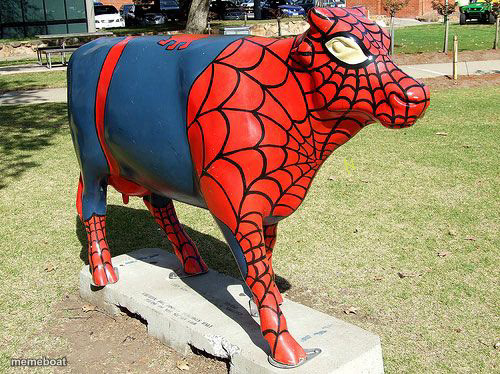
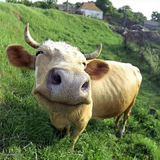
A cow statue painted like Spider-Man, webs and all, standing in a park. The absurd crossover meme nobody asked for — caption it free.
Blank SpiderCow meme template
Download the blank SpiderCow template to caption it yourself, or add your text right here in the editor above and download the finished meme.
When to use the SpiderCow meme
- Something mundane getting an unnecessary superhero upgrade
- Reacting to a bizarre crossover nobody asked for
- A coworker who's suddenly overqualified for a boring task
- Pure random "why does this exist" commentary
SpiderCow template facts
- Featuring
- Spider-Cow (painted cow statue art installation)
- Dimensions
- 500 × 374 px
- Format
- JPG
- Text boxes
- 1
- Added
- 2025
About the SpiderCow meme template
Somewhere a public art project let this happen: a fiberglass cow, fully webbed up in red and blue like it just got bit by a radioactive spider instead of grazing in a field. It's silly, it's real, and it photographs perfectly for meme duty.
Use it for anything unexpectedly overpowered, oddly specific crossovers, or just pure "why does this exist" energy.
Popular SpiderCow caption ideas
with great milk comes great responsibility
me after one Red Bull
local farm upgrades security system
Templates similar to SpiderCow




SpiderCow meme FAQ
How do I make a SpiderCow meme?
Scroll up to the SpiderCow template, type your caption into the text box in the editor above, adjust the font, size and color if you like, then click download. Your finished SpiderCow meme is ready to share in seconds.
Can I use the SpiderCow template for free?
Yes. The SpiderCow template is completely free to use — no signup and no limits on how many memes you create or where you share them.
How do I download my SpiderCow meme?
Click the download button under the editor once your SpiderCow meme looks right. It saves straight to your device as a high-quality PNG or JPEG image.
How do I download the blank SpiderCow template?
Use the "Download blank template" button in the blank SpiderCow template section above to save the original, un-captioned image — handy if you'd rather caption it in another app or keep a copy.