
Speed Tonk Meme Generator
Create Your Speed Tonk Meme
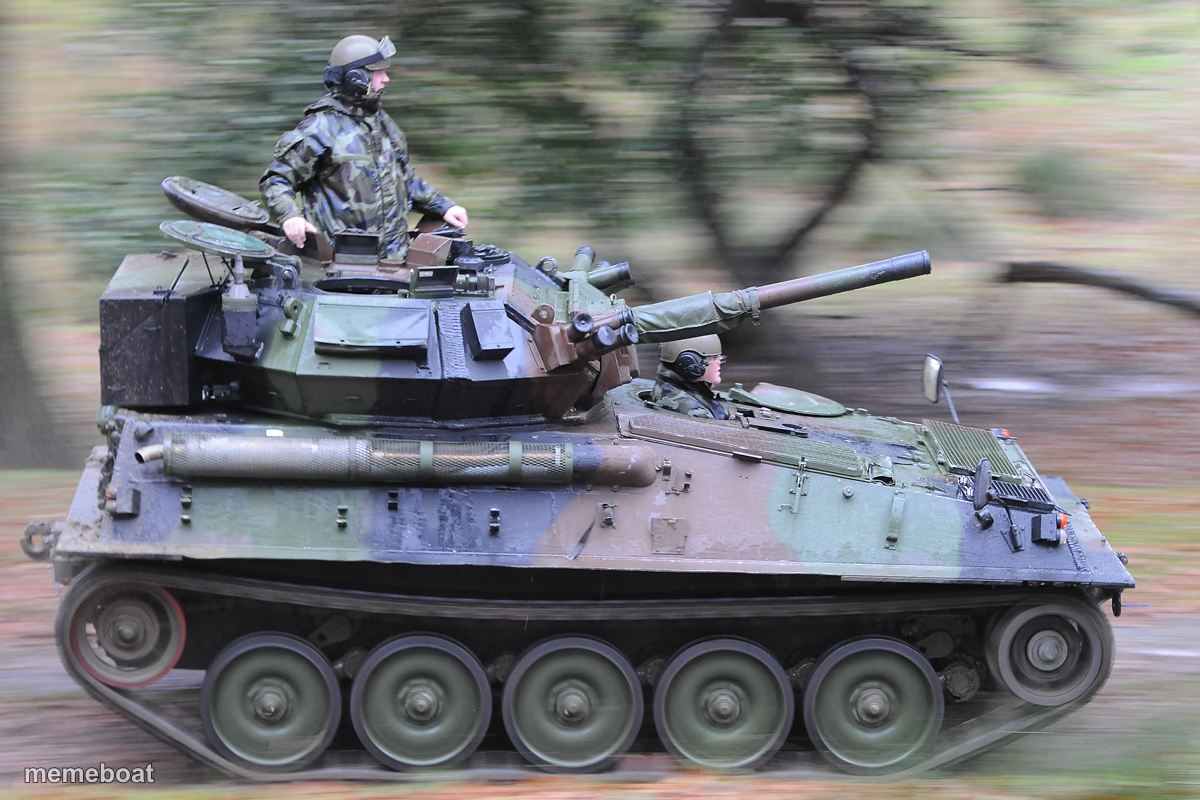
A small tracked military vehicle blasting past at speed with a soldier standing in the hatch. Perfect for 'going too fast' or overkill jokes. Free to caption.
Blank Speed Tonk meme template
Download the blank Speed Tonk template to caption it yourself, or add your text right here in the editor above and download the finished meme.
When to use the Speed Tonk meme
- When you bring way too much firepower to a small argument
- Reacting to someone going full speed with zero chill
- Showing up to handle a tiny problem like it's a war
Speed Tonk template facts
- Dimensions
- 1200 × 800 px
- Format
- JPG
- Text boxes
- 1
- Added
- 2025
About the Speed Tonk meme template
Nothing says 'I am not slowing down for anyone' like a guy standing in a tank hatch while the whole thing rips past in a motion-blurred forest. The blurred background sells the speed and the soldier's stance sells the confidence.
Use this one for any joke about going full send, overreacting with way too much force, or showing up to a small problem with heavy-duty equipment. It's the visual definition of 'nuclear option.'
Popular Speed Tonk caption ideas
Me arriving to defend my group chat opinion
When you reply-all by accident and have to fix it fast
My reaction time when someone touches my leftovers
Templates similar to Speed Tonk



Speed Tonk meme FAQ
How do I make a Speed Tonk meme?
Scroll up to the Speed Tonk template, type your caption into the text box in the editor above, adjust the font, size and color if you like, then click download. Your finished Speed Tonk meme is ready to share in seconds.
Can I use the Speed Tonk template for free?
Yes. The Speed Tonk template is completely free to use — no signup and no limits on how many memes you create or where you share them.
How do I download my Speed Tonk meme?
Click the download button under the editor once your Speed Tonk meme looks right. It saves straight to your device as a high-quality PNG or JPEG image.
How do I download the blank Speed Tonk template?
Use the "Download blank template" button in the blank Speed Tonk template section above to save the original, un-captioned image — handy if you'd rather caption it in another app or keep a copy.