
Jeremy Clarkson Genius Meme Generator
Create Your Jeremy Clarkson Genius Meme
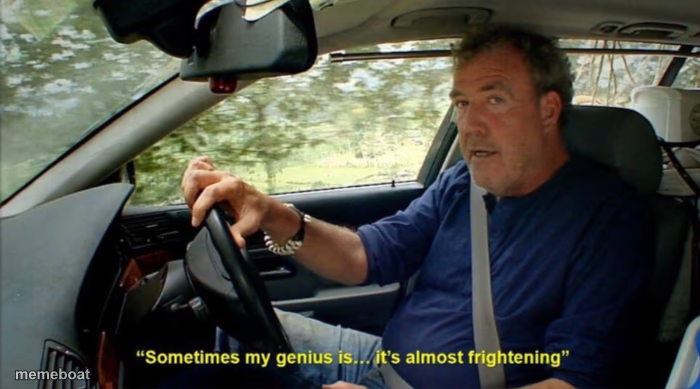
Jeremy Clarkson behind the wheel, deadpan, delivering "sometimes my genius is... it's almost frightening." Perfect for humble-bragging about dumb luck. Free caption tool.
Blank Jeremy Clarkson Genius meme template
Download the blank Jeremy Clarkson Genius template to caption it yourself, or add your text right here in the editor above and download the finished meme.
When to use the Jeremy Clarkson Genius meme
- Bragging about a solution you stumbled into by pure luck
- Taking credit for something that worked out by accident
- The confidence of someone who just guessed correctly on a test
- Reacting to your own dumb-luck fix at work
Jeremy Clarkson Genius template facts
- Featuring
- Jeremy Clarkson (Top Gear)
- Dimensions
- 700 × 389 px
- Format
- PNG
- Added
- 2025
About the Jeremy Clarkson Genius meme template
Jeremy Clarkson, seatbelt on, driving down a country road, hitting you with the most self-satisfied line in Top Gear history: "Sometimes my genius is... it's almost frightening." The delivery is so deadpan it works for literally any accidental win.
Templates similar to Jeremy Clarkson Genius


Jeremy Clarkson Genius meme FAQ
How do I make a Jeremy Clarkson Genius meme?
Scroll up to the Jeremy Clarkson Genius template, add your own text boxes in the editor above and type your captions, adjust the font, size and color if you like, then click download. Your finished Jeremy Clarkson Genius meme is ready to share in seconds.
Can I use the Jeremy Clarkson Genius template for free?
Yes. The Jeremy Clarkson Genius template is completely free to use — no signup and no limits on how many memes you create or where you share them.
How do I download my Jeremy Clarkson Genius meme?
Click the download button under the editor once your Jeremy Clarkson Genius meme looks right. It saves straight to your device as a high-quality PNG or JPEG image.
How do I download the blank Jeremy Clarkson Genius template?
Use the "Download blank template" button in the blank Jeremy Clarkson Genius template section above to save the original, un-captioned image — handy if you'd rather caption it in another app or keep a copy.