
Sneaky tom Meme Generator
Create Your Sneaky tom Meme
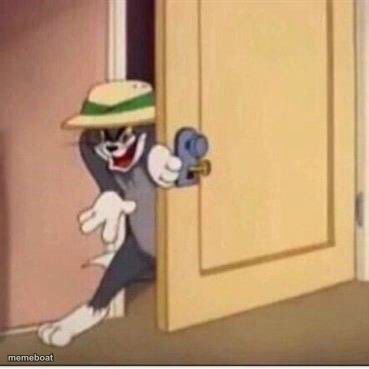
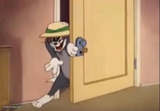
Tom the cat sneaking through a cracked door with a sly grin — perfect for plans nobody was supposed to notice. Caption it free, no sign-up.
Blank Sneaky tom meme template
Download the blank Sneaky tom template to caption it yourself, or add your text right here in the editor above and download the finished meme.
When to use the Sneaky tom meme
- Sneaking a snack from the office fridge
- Slipping into a Zoom call 10 minutes late
- Checking if anyone noticed you left early
- Peeking to see if the coast is clear before a prank
Sneaky tom template facts
- Featuring
- Tom (Tom and Jerry)
- Dimensions
- 369 × 369 px
- Format
- JPG
- Text boxes
- 1
- Added
- 2025
About the Sneaky tom meme template
Tom is peeking round a door he's barely opened, hat cocked, grin full of mischief, hand already on the knob like he's about to do something he shouldn't. It's the universal pose of someone easing into a room they don't belong in.
Use it for sneaking snacks, sneaking into a meeting late, or any moment you're tiptoeing toward trouble and hoping nobody looks up.
Popular Sneaky tom caption ideas
me checking if my package arrived before my roommate notices
when you hear your name in a conversation and need details
sneaking back into the meeting after you muted yourself for 20 minutes

Sneaky tom meme FAQ
How do I make a Sneaky tom meme?
Scroll up to the Sneaky tom template, type your caption into the text box in the editor above, adjust the font, size and color if you like, then click download. Your finished Sneaky tom meme is ready to share in seconds.
Can I use the Sneaky tom template for free?
Yes. The Sneaky tom template is completely free to use — no signup and no limits on how many memes you create or where you share them.
How do I download my Sneaky tom meme?
Click the download button under the editor once your Sneaky tom meme looks right. It saves straight to your device as a high-quality PNG or JPEG image.
How do I download the blank Sneaky tom template?
Use the "Download blank template" button in the blank Sneaky tom template section above to save the original, un-captioned image — handy if you'd rather caption it in another app or keep a copy.