
Smug Jax Meme Generator
Create Your Smug Jax Meme
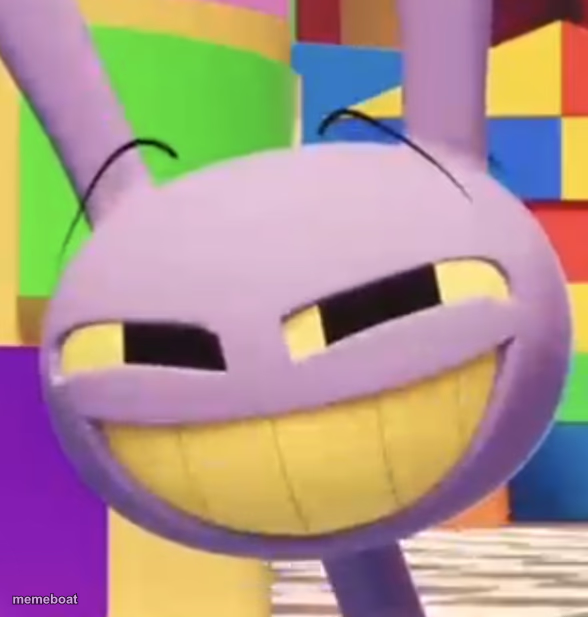
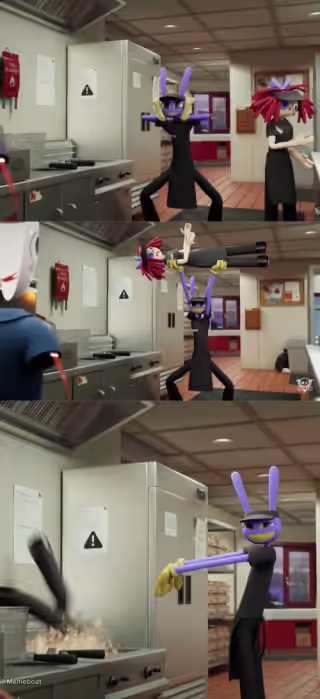
Jax from The Amazing Digital Circus grinning smugly right at the camera. Perfect for sarcasm, mischief, and 'I did that on purpose' moments. Free to caption.
Blank Smug Jax meme template
Download the blank Smug Jax template to caption it yourself, or add your text right here in the editor above and download the finished meme.
When to use the Smug Jax meme
- Reacting smugly after causing chaos and getting away with it
- The face you make when you know you're right and everyone else is wrong
- Pure mischief energy before doing something you shouldn't
Smug Jax template facts
- Featuring
- Jax (The Amazing Digital Circus)
- Dimensions
- 588 × 617 px
- Format
- PNG
- Text boxes
- 1
- Added
- 2025
About the Smug Jax meme template
Jax, the purple rabbit troublemaker from The Amazing Digital Circus, leans in with that unmistakable ear-to-ear grin that says he's absolutely up to something and enjoying every second of it.
This face is built for smug reaction humor: getting away with chaos, gaslighting someone with total confidence, or just reacting to something ridiculous with zero remorse. If your caption needs a 'yeah, I did that' energy, this is the face.
Popular Smug Jax caption ideas
NO NOSE AND KEEPS HIS MOUTH CLOSED ALL DAY · STILL GETS FANS
me after replying 'k' to a paragraph text
when the plan works perfectly and nobody suspects a thing
deleted the group project file and said nothing



Smug Jax meme FAQ
How do I make a Smug Jax meme?
Scroll up to the Smug Jax template, type your caption into the text box in the editor above, adjust the font, size and color if you like, then click download. Your finished Smug Jax meme is ready to share in seconds.
Can I use the Smug Jax template for free?
Yes. The Smug Jax template is completely free to use — no signup and no limits on how many memes you create or where you share them.
How do I download my Smug Jax meme?
Click the download button under the editor once your Smug Jax meme looks right. It saves straight to your device as a high-quality PNG or JPEG image.
How do I download the blank Smug Jax template?
Use the "Download blank template" button in the blank Smug Jax template section above to save the original, un-captioned image — handy if you'd rather caption it in another app or keep a copy.