
Smoking Snake Meme Generator
Create Your Smoking Snake Meme
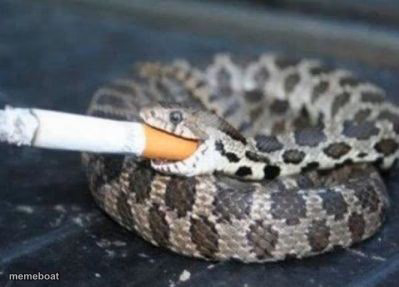
A snake coiled up smoking a cigarette like it's got zero regrets — the perfect template for pure chaotic-cool energy jokes. Free to caption and download.
Blank Smoking Snake meme template
Download the blank Smoking Snake template to caption it yourself, or add your text right here in the editor above and download the finished meme.
When to use the Smoking Snake meme
- That one friend who handles every disaster with zero visible panic
- Walking out of a meeting that should have been an email
- Surviving Monday against all odds
- The 'I've seen things' energy after a rough week
Smoking Snake template facts
- Dimensions
- 399 × 287 px
- Format
- JPG
- Text boxes
- 1
- Added
- 2025
About the Smoking Snake meme template
This snake is not stressed, not worried, not even a little bit bothered. It's just coiled up in the dirt with a cigarette hanging out of its mouth like it just got off a 12-hour shift and doesn't care who sees it. Somehow one of the most quietly hilarious animal photos on the internet.
Popular Smoking Snake caption ideas
me after surviving the group project
my liver, probably
monday me pretending i have a plan
Templates similar to Smoking Snake



Smoking Snake meme FAQ
How do I make a Smoking Snake meme?
Scroll up to the Smoking Snake template, type your caption into the text box in the editor above, adjust the font, size and color if you like, then click download. Your finished Smoking Snake meme is ready to share in seconds.
Can I use the Smoking Snake template for free?
Yes. The Smoking Snake template is completely free to use — no signup and no limits on how many memes you create or where you share them.
How do I download my Smoking Snake meme?
Click the download button under the editor once your Smoking Snake meme looks right. It saves straight to your device as a high-quality PNG or JPEG image.
How do I download the blank Smoking Snake template?
Use the "Download blank template" button in the blank Smoking Snake template section above to save the original, un-captioned image — handy if you'd rather caption it in another app or keep a copy.