
sleepy rui Meme Generator
Create Your sleepy rui Meme
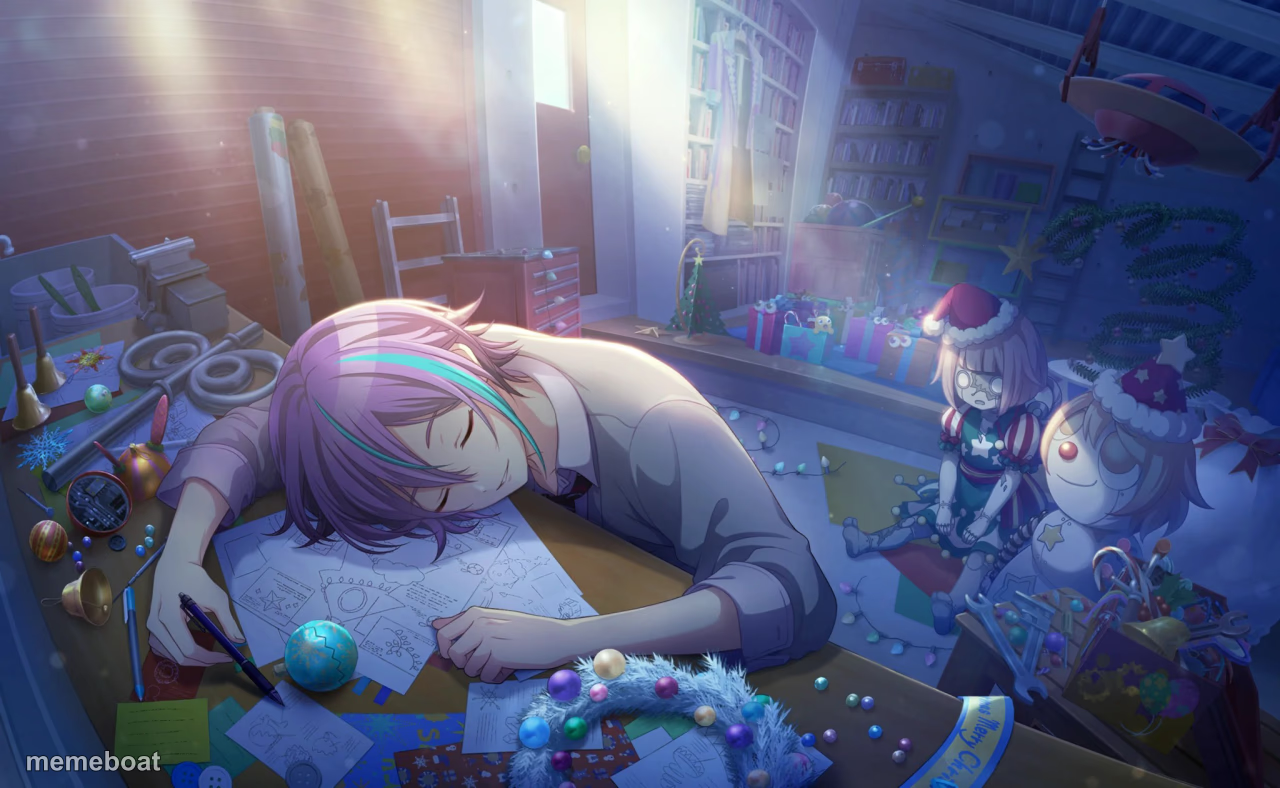
Anime girl passed out asleep at her cluttered workshop desk surrounded by ornaments and dolls. Perfect for late-night crunch and deadline memes. Caption free.
Blank sleepy rui meme template
Download the blank sleepy rui template to caption it yourself, or add your text right here in the editor above and download the finished meme.
When to use the sleepy rui meme
- Finishing holiday crafts or gift wrapping until you literally collapse
- Pulling an all-nighter on a school or work project
- The moment right after finally submitting the assignment
- Trying to keep up with everyone else's Etsy shop and burning out
sleepy rui template facts
- Dimensions
- 1280 × 788 px
- Format
- JPG
- Text boxes
- 2
- Added
- 2025
About the sleepy rui meme template
Somewhere between the paint jars, the tangled string lights, and a half-finished doll army watching from the shelf, this exhausted crafter just gave up and face-planted onto her own workbench. It's the universal image of grinding on a project until your body simply says no more, mid-brushstroke, mid-sentence, mid-everything.
Whether you're finishing a school project at 3am, wrapping presents until you pass out, or just done with your to-do list, this template captures that glorious moment of surrender. Drop in your own caption about deadlines, holiday prep, or creative burnout and download it free.
Popular sleepy rui caption ideas
Me at 3am finishing the gifts · Also me at 8am when they ask if it's done
When you say 'just five more minutes' of crafting · and wake up with a paintbrush in your hand
The whole workshop staring at you · while you nap through the deadline
Templates similar to sleepy rui

sleepy rui meme FAQ
How do I make a sleepy rui meme?
Scroll up to the sleepy rui template, type your caption into the 2 text boxes in the editor above, adjust the font, size and color if you like, then click download. Your finished sleepy rui meme is ready to share in seconds.
Can I use the sleepy rui template for free?
Yes. The sleepy rui template is completely free to use — no signup and no limits on how many memes you create or where you share them.
How do I download my sleepy rui meme?
Click the download button under the editor once your sleepy rui meme looks right. It saves straight to your device as a high-quality PNG or JPEG image.
How do I download the blank sleepy rui template?
Use the "Download blank template" button in the blank sleepy rui template section above to save the original, un-captioned image — handy if you'd rather caption it in another app or keep a copy.