
Sixth Sense Meme Generator
Create Your Sixth Sense Meme
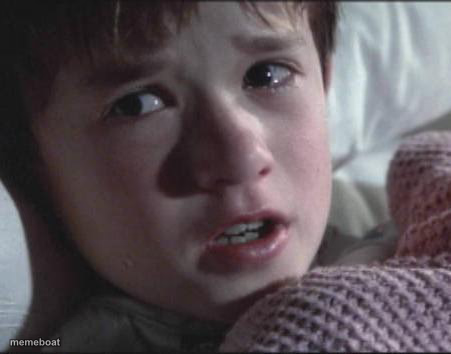
The wide-eyed, terrified kid from The Sixth Sense bracing for something spooky — great for reacting to unsettling news or jump scares. Free to caption.
Blank Sixth Sense meme template
Download the blank Sixth Sense template to caption it yourself, or add your text right here in the editor above and download the finished meme.
When to use the Sixth Sense meme
- When you check your bank account after the weekend
- Seeing a spider crawl across the ceiling at 2am
- Reacting to your search history getting exposed
Sixth Sense template facts
- Featuring
- Cole Sear (The Sixth Sense)
- Dimensions
- 451 × 354 px
- Format
- JPG
- Text boxes
- 1
- Added
- 2025
About the Sixth Sense meme template
That kid, that blanket, that thousand-yard stare of pure dread. He's not okay, and honestly neither are you after reading whatever text message just came in.
Great for anything unsettling, spooky season posts, or 'I just saw something I can't unsee' moments. The wide eyes and shaky voice do all the emotional heavy lifting for you.
Popular Sixth Sense caption ideas
Me checking my bank account Monday morning
When you see a spider and it sees you back
I see unread emails
Templates similar to Sixth Sense

Sixth Sense meme FAQ
How do I make a Sixth Sense meme?
Scroll up to the Sixth Sense template, type your caption into the text box in the editor above, adjust the font, size and color if you like, then click download. Your finished Sixth Sense meme is ready to share in seconds.
Can I use the Sixth Sense template for free?
Yes. The Sixth Sense template is completely free to use — no signup and no limits on how many memes you create or where you share them.
How do I download my Sixth Sense meme?
Click the download button under the editor once your Sixth Sense meme looks right. It saves straight to your device as a high-quality PNG or JPEG image.
How do I download the blank Sixth Sense template?
Use the "Download blank template" button in the blank Sixth Sense template section above to save the original, un-captioned image — handy if you'd rather caption it in another app or keep a copy.