
SIT BULL Meme Generator
Create Your SIT BULL Meme
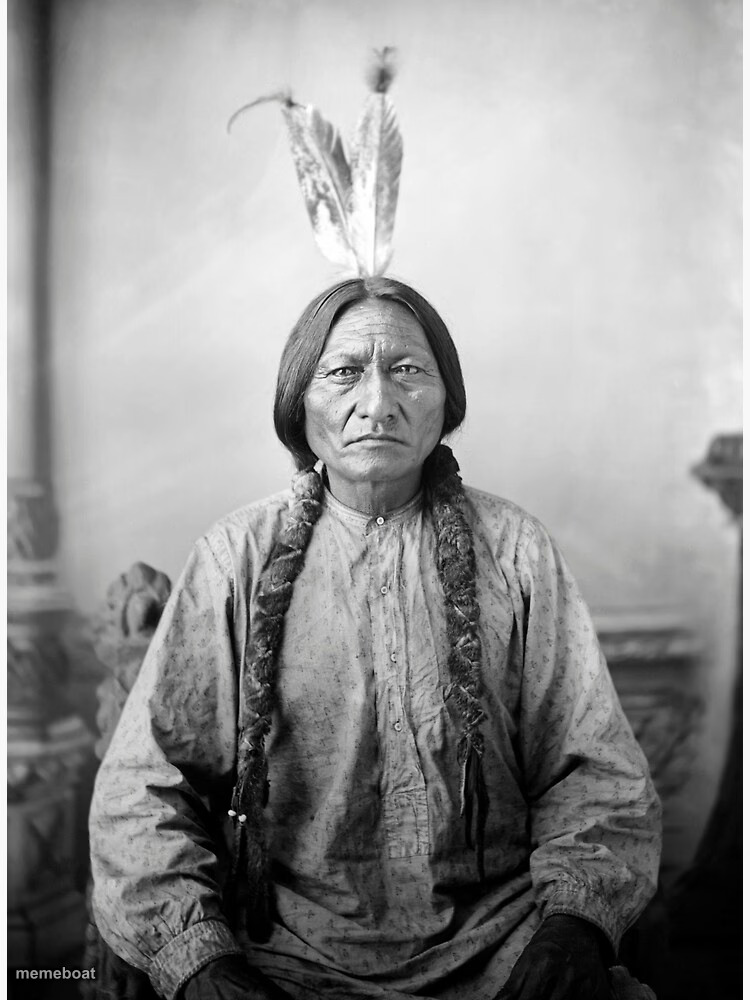
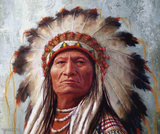
A stern historic portrait paired with the pun 'SIT BULL' — perfect for stubborn-dog jokes and anything that refuses to obey a simple command. Caption free.
Blank SIT BULL meme template
Download the blank SIT BULL template to caption it yourself, or add your text right here in the editor above and download the finished meme.
When to use the SIT BULL meme
- A dog that flatly refuses basic commands
- Anyone stubbornly ignoring a simple request
- Reacting to being told what to do with zero intention of complying
- The face of quiet, immovable defiance
SIT BULL template facts
- Dimensions
- 750 × 1000 px
- Format
- JPG
- Text boxes
- 1
- Added
- 2025
About the SIT BULL meme template
A dignified, unmistakably serious historical portrait turned into a one-word pun that never gets old: Sit Bull, staring you down like he's already decided he's not doing what you asked. That deadpan stare does all the comedic heavy lifting.
Use it for stubborn pets, defiant coworkers, or anyone who hears an instruction and chooses violence (in the form of ignoring it completely).
Popular SIT BULL caption ideas
IF THE GOVERNMENT SAYS, "YOU DON'T NEED A GUN" · YOU NEED A GUN!!!
Me when my manager asks me to 'circle back'
When you ask a cat to do literally anything

SIT BULL meme FAQ
How do I make a SIT BULL meme?
Scroll up to the SIT BULL template, type your caption into the text box in the editor above, adjust the font, size and color if you like, then click download. Your finished SIT BULL meme is ready to share in seconds.
Can I use the SIT BULL template for free?
Yes. The SIT BULL template is completely free to use — no signup and no limits on how many memes you create or where you share them.
How do I download my SIT BULL meme?
Click the download button under the editor once your SIT BULL meme looks right. It saves straight to your device as a high-quality PNG or JPEG image.
How do I download the blank SIT BULL template?
Use the "Download blank template" button in the blank SIT BULL template section above to save the original, un-captioned image — handy if you'd rather caption it in another app or keep a copy.