
Silly Gorosei Meme Generator
Create Your Silly Gorosei Meme
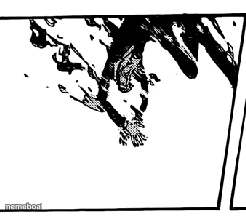
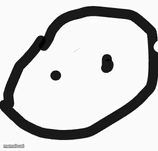
A high-contrast black and white abstract shape that reads like a Rorschach blot — a blank-slate template you can caption however you want, free.
Blank Silly Gorosei meme template
Download the blank Silly Gorosei template to caption it yourself, or add your text right here in the editor above and download the finished meme.
When to use the Silly Gorosei meme
- Asking 'what do you see' Rorschach-style jokes
- Surreal non-sequitur punchlines
- Captioning something deliberately nonsensical
- Reaction to a conversation that made zero sense
Silly Gorosei template facts
- Dimensions
- 246 × 216 px
- Format
- PNG
- Text boxes
- 2
- Added
- 2025
About the Silly Gorosei meme template
Honestly, nobody knows what this is. It's a stark black-and-white shape that could be a splash, a shadow, or a Rorschach test gone wrong — and that's exactly why it works as a meme template. Pure ambiguity is the whole joke.
Drop in a caption asking people what they see, or use it as a surreal non-sequitur punchline when nothing else fits.
Popular Silly Gorosei caption ideas
what I see: · chaos. pure chaos.
my thought process · at 3am
therapist: what do you see? · me:
Templates similar to Silly Gorosei




Silly Gorosei meme FAQ
How do I make a Silly Gorosei meme?
Scroll up to the Silly Gorosei template, type your caption into the 2 text boxes in the editor above, adjust the font, size and color if you like, then click download. Your finished Silly Gorosei meme is ready to share in seconds.
Can I use the Silly Gorosei template for free?
Yes. The Silly Gorosei template is completely free to use — no signup and no limits on how many memes you create or where you share them.
How do I download my Silly Gorosei meme?
Click the download button under the editor once your Silly Gorosei meme looks right. It saves straight to your device as a high-quality PNG or JPEG image.
How do I download the blank Silly Gorosei template?
Use the "Download blank template" button in the blank Silly Gorosei template section above to save the original, un-captioned image — handy if you'd rather caption it in another app or keep a copy.