
Comedian Shut Up Meme Generator
Create Your Comedian Shut Up Meme
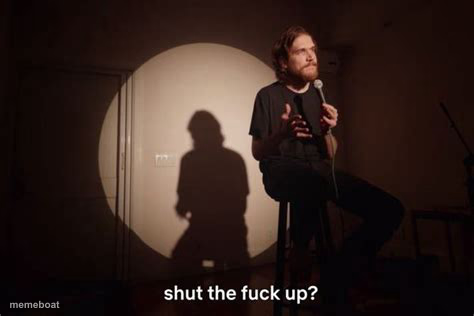
A stand-up comedian sits under a spotlight with his shadow looming behind him, captioned "shut the f*** up?" — perfect for shutting down bad takes.
Blank Comedian Shut Up meme template
Download the blank Comedian Shut Up template to caption it yourself, or add your text right here in the editor above and download the finished meme.
When to use the Comedian Shut Up meme
- Responding to an unhinged hot take
- Roasting someone who just said something dumb
- Dead silence after an awkward joke bombs
Comedian Shut Up template facts
- Dimensions
- 474 × 316 px
- Format
- JPG
- Text boxes
- 1
- Added
- 2025
About the Comedian Shut Up meme template
A guy doing stand-up, stool, mic stand, giant dramatic shadow on the wall behind him like he's about to drop the darkest punchline of the night. The original caption reads like a comedian roasting a heckler mid-set.
Use it whenever someone says something so wrong you need a beat of silence before responding. The shadow adds free production value.
Popular Comedian Shut Up caption ideas
did you just say pineapple belongs on pizza?
my landlord raised rent again
"actually, Die Hard isn't a Christmas movie"
Templates similar to Comedian Shut Up

Comedian Shut Up meme FAQ
How do I make a Comedian Shut Up meme?
Scroll up to the Comedian Shut Up template, type your caption into the text box in the editor above, adjust the font, size and color if you like, then click download. Your finished Comedian Shut Up meme is ready to share in seconds.
Can I use the Comedian Shut Up template for free?
Yes. The Comedian Shut Up template is completely free to use — no signup and no limits on how many memes you create or where you share them.
How do I download my Comedian Shut Up meme?
Click the download button under the editor once your Comedian Shut Up meme looks right. It saves straight to your device as a high-quality PNG or JPEG image.
How do I download the blank Comedian Shut Up template?
Use the "Download blank template" button in the blank Comedian Shut Up template section above to save the original, un-captioned image — handy if you'd rather caption it in another app or keep a copy.