
Confident Tom Meme Generator
Create Your Confident Tom Meme
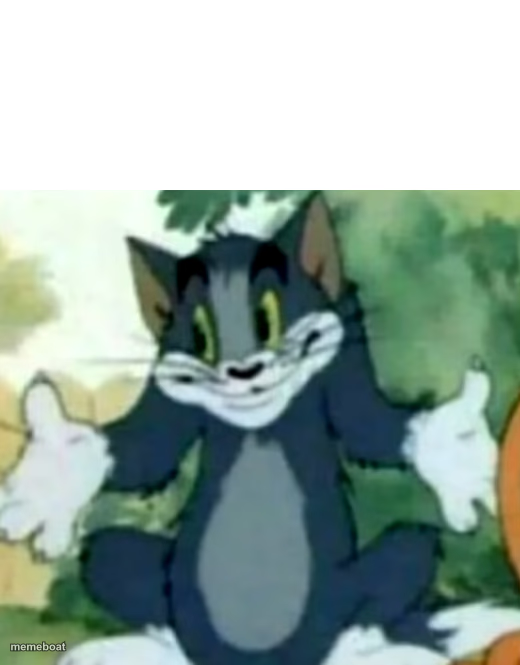
Tom the cat shrugging with a smug, confident grin — the classic template for "no big deal" or self-assured bragging. Caption it free right now.
Blank Confident Tom meme template
Download the blank Confident Tom template to caption it yourself, or add your text right here in the editor above and download the finished meme.
When to use the Confident Tom meme
- Playing it cool after barely passing a test you didn't study for
- Shrugging off a problem that's clearly still on fire
- Genuinely flexing when a plan comes together perfectly
Confident Tom template facts
- Featuring
- Tom (Tom and Jerry)
- Dimensions
- 520 × 665 px
- Format
- PNG
- Added
- 2025
About the Confident Tom meme template
Tom, sitting pretty in the garden with his paws up in a cool little shrug and a grin that says he's got this completely under control. No panic, no stress, just pure feline confidence.
Use it for any moment where you want to project total nonchalance about something that's actually a disaster, or genuinely for flexing when something worked out perfectly.
Popular Confident Tom caption ideas
TEACHER: IF YOU DON'T UNDERSTAND SOMETHING, ASK ME AGAIN. Me: *asks what book he uses to teach us* · TEACHER:
Templates similar to Confident Tom

Confident Tom meme FAQ
How do I make a Confident Tom meme?
Scroll up to the Confident Tom template, add your own text boxes in the editor above and type your captions, adjust the font, size and color if you like, then click download. Your finished Confident Tom meme is ready to share in seconds.
Can I use the Confident Tom template for free?
Yes. The Confident Tom template is completely free to use — no signup and no limits on how many memes you create or where you share them.
How do I download my Confident Tom meme?
Click the download button under the editor once your Confident Tom meme looks right. It saves straight to your device as a high-quality PNG or JPEG image.
How do I download the blank Confident Tom template?
Use the "Download blank template" button in the blank Confident Tom template section above to save the original, un-captioned image — handy if you'd rather caption it in another app or keep a copy.