
Shronkey Meme Generator
Create Your Shronkey Meme
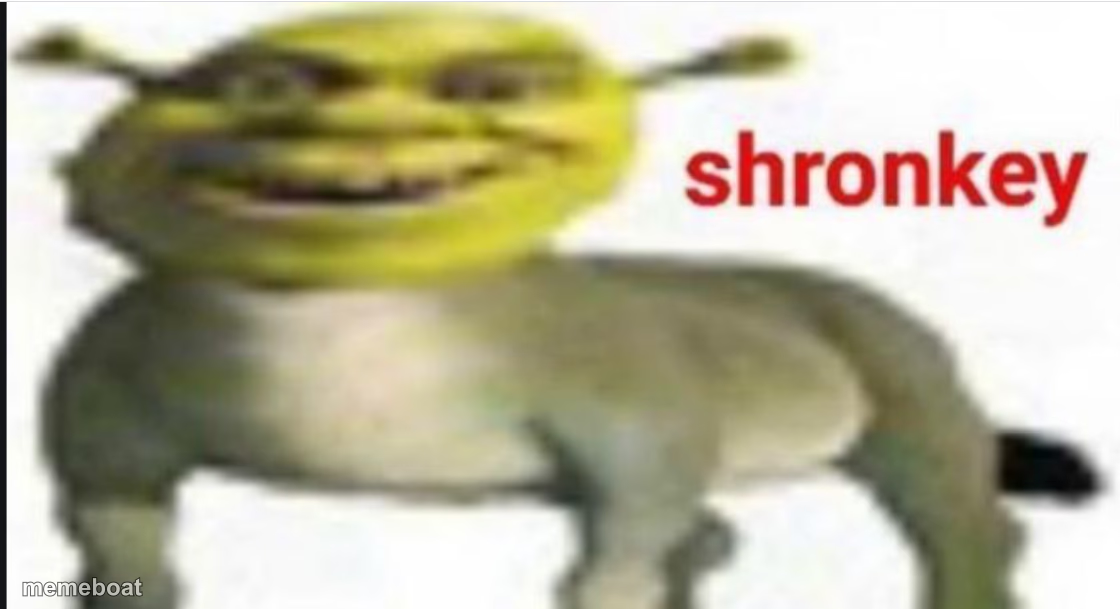
The Shrek-donkey hybrid meme with the 'shronkey' label. Perfect for anything unsettling, hybrid, or so-wrong-it's-right. Caption it free, download instantly.
Blank Shronkey meme template
Download the blank Shronkey template to caption it yourself, or add your text right here in the editor above and download the finished meme.
When to use the Shronkey meme
- Reacting to a cursed image or food combo that shouldn't exist
- Describing a coworker or friend who's a weird hybrid of two personalities
- Any bad Photoshop/AI mashup that came out unsettling
- Tagging something as 'this is now canon and I hate it'
Shronkey template facts
- Featuring
- Shronkey (Shrek (fan edit meme))
- Dimensions
- 1120 × 609 px
- Format
- PNG
- Added
- 2025
About the Shronkey meme template
It's Shrek's face bolted onto Donkey's body, labeled in giant red comic-sans-adjacent letters: shronkey. There is no lore here, no explanation needed — it just IS, and that's the entire joke. The uncanny valley grin does most of the heavy lifting.
Use it whenever two things got smushed together and nobody asked for it — bad Photoshop jobs, cursed food combos, that one coworker who's part manager part group chat meme. Anything that should not exist but now does.
Templates similar to Shronkey

Shronkey meme FAQ
How do I make a Shronkey meme?
Scroll up to the Shronkey template, add your own text boxes in the editor above and type your captions, adjust the font, size and color if you like, then click download. Your finished Shronkey meme is ready to share in seconds.
Can I use the Shronkey template for free?
Yes. The Shronkey template is completely free to use — no signup and no limits on how many memes you create or where you share them.
How do I download my Shronkey meme?
Click the download button under the editor once your Shronkey meme looks right. It saves straight to your device as a high-quality PNG or JPEG image.
How do I download the blank Shronkey template?
Use the "Download blank template" button in the blank Shronkey template section above to save the original, un-captioned image — handy if you'd rather caption it in another app or keep a copy.