
Show us your story Meme Generator
Create Your Show us your story Meme
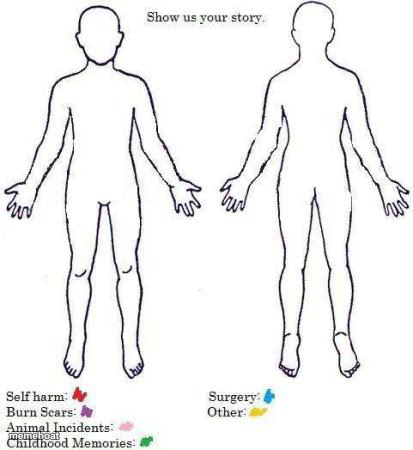
Front-and-back body outline chart with color-coded labels for marking scars, surgeries, and stories — fill it in and caption it free.
Blank Show us your story meme template
Download the blank Show us your story template to caption it yourself, or add your text right here in the editor above and download the finished meme.
When to use the Show us your story meme
- Mapping out every scar and its embarrassing origin story
- Turning a gym injury into a full-body confession
- Joking about the time a goose attacked you as a kid
- Cataloging every scar from bad decisions in your twenties
Show us your story template facts
- Dimensions
- 413 × 450 px
- Format
- JPG
- Added
- 2025
About the Show us your story meme template
Two blank body outlines, front and back, with a little legend underneath asking you to color-code your life: self harm, burn scars, animal incidents, childhood memories, surgery, other. It's part diary, part dark comedy, and it works because everyone's body has at least one weird story attached.
Popular Show us your story caption ideas
ME · MY SISTER
Templates similar to Show us your story

Show us your story meme FAQ
How do I make a Show us your story meme?
Scroll up to the Show us your story template, add your own text boxes in the editor above and type your captions, adjust the font, size and color if you like, then click download. Your finished Show us your story meme is ready to share in seconds.
Can I use the Show us your story template for free?
Yes. The Show us your story template is completely free to use — no signup and no limits on how many memes you create or where you share them.
How do I download my Show us your story meme?
Click the download button under the editor once your Show us your story meme looks right. It saves straight to your device as a high-quality PNG or JPEG image.
How do I download the blank Show us your story template?
Use the "Download blank template" button in the blank Show us your story template section above to save the original, un-captioned image — handy if you'd rather caption it in another app or keep a copy.