
Shaun The Sheep Zoom Meme Generator
Create Your Shaun The Sheep Zoom Meme
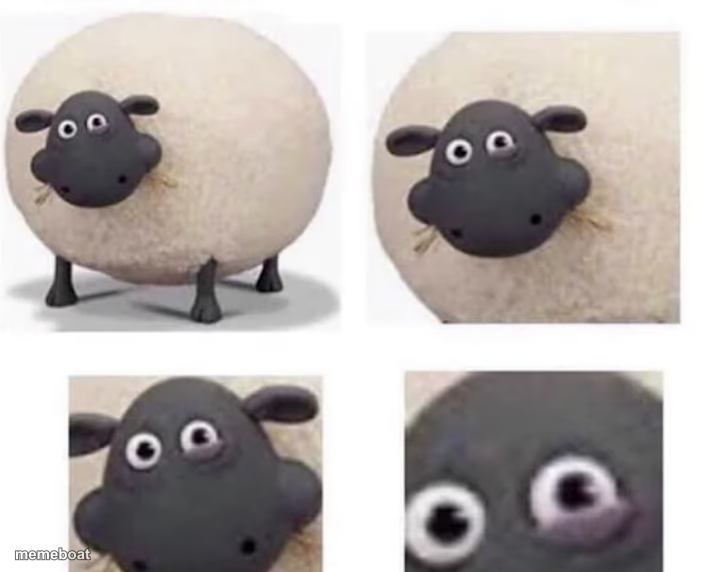
Claymation sheep zooming in panel by panel until one eye goes wide and unsettling — perfect for 'wait, what?' realization jokes. Free to caption.
Blank Shaun The Sheep Zoom meme template
Download the blank Shaun The Sheep Zoom template to caption it yourself, or add your text right here in the editor above and download the finished meme.
When to use the Shaun The Sheep Zoom meme
- The slow realization that something is very wrong
- Zooming in on a small detail that changes everything
- Going from calm to 'wait a second' in stages
Shaun The Sheep Zoom template facts
- Featuring
- Shaun the Sheep
- Dimensions
- 712 × 572 px
- Format
- PNG
- Text boxes
- 2
- Added
- 2025
About the Shaun The Sheep Zoom meme template
Cute claymation sheep face, zoomed in closer and closer, until suddenly one eye looks completely unhinged in the final close-up. It's a great template for the slow build to a moment of dawning horror or disbelief.
Popular Shaun The Sheep Zoom caption ideas
reading the group chat · wait what did they just say
checking my bank balance · after the weekend
him: I'm fine · his search history
Templates similar to Shaun The Sheep Zoom


Shaun The Sheep Zoom meme FAQ
How do I make a Shaun The Sheep Zoom meme?
Scroll up to the Shaun The Sheep Zoom template, type your caption into the 2 text boxes in the editor above, adjust the font, size and color if you like, then click download. Your finished Shaun The Sheep Zoom meme is ready to share in seconds.
Can I use the Shaun The Sheep Zoom template for free?
Yes. The Shaun The Sheep Zoom template is completely free to use — no signup and no limits on how many memes you create or where you share them.
How do I download my Shaun The Sheep Zoom meme?
Click the download button under the editor once your Shaun The Sheep Zoom meme looks right. It saves straight to your device as a high-quality PNG or JPEG image.
How do I download the blank Shaun The Sheep Zoom template?
Use the "Download blank template" button in the blank Shaun The Sheep Zoom template section above to save the original, un-captioned image — handy if you'd rather caption it in another app or keep a copy.