
Shake and Bake Meme Generator
Create Your Shake and Bake Meme

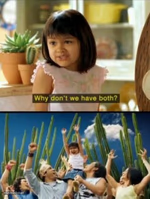
The wide-eyed girl from the classic Shake 'n Bake commercial, box in frame, mid-confused reaction. Great for 'wait, what?' moments. Free to caption and download.
Blank Shake and Bake meme template
Download the blank Shake and Bake template to caption it yourself, or add your text right here in the editor above and download the finished meme.
When to use the Shake and Bake meme
- When someone tells you the group project deadline moved up
- Finding out the thing you've been doing wrong the whole time
Shake and Bake template facts
- Featuring
- Shake 'n Bake Girl (Shake 'n Bake commercial)
- Dimensions
- 500 × 338 px
- Format
- JPG
- Added
- 2026
About the Shake and Bake meme template
That commercial kid who somehow became a legend just by making the most gloriously confused face at a box of Shake 'n Bake. Wide eyes, mouth half open, clearly processing something she was not prepared for.
It's the perfect reaction to any statement that stops you cold. Someone says something wild, unexpected, or slightly insane and this is exactly the face you make before you can even form words.
Popular Shake and Bake caption ideas
AND I HELPED!
Templates similar to Shake and Bake


Shake and Bake meme FAQ
How do I make a Shake and Bake meme?
Scroll up to the Shake and Bake template, add your own text boxes in the editor above and type your captions, adjust the font, size and color if you like, then click download. Your finished Shake and Bake meme is ready to share in seconds.
Can I use the Shake and Bake template for free?
Yes. The Shake and Bake template is completely free to use — no signup and no limits on how many memes you create or where you share them.
How do I download my Shake and Bake meme?
Click the download button under the editor once your Shake and Bake meme looks right. It saves straight to your device as a high-quality PNG or JPEG image.
How do I download the blank Shake and Bake template?
Use the "Download blank template" button in the blank Shake and Bake template section above to save the original, un-captioned image — handy if you'd rather caption it in another app or keep a copy.