
Seth no Meme Generator
Create Your Seth no Meme
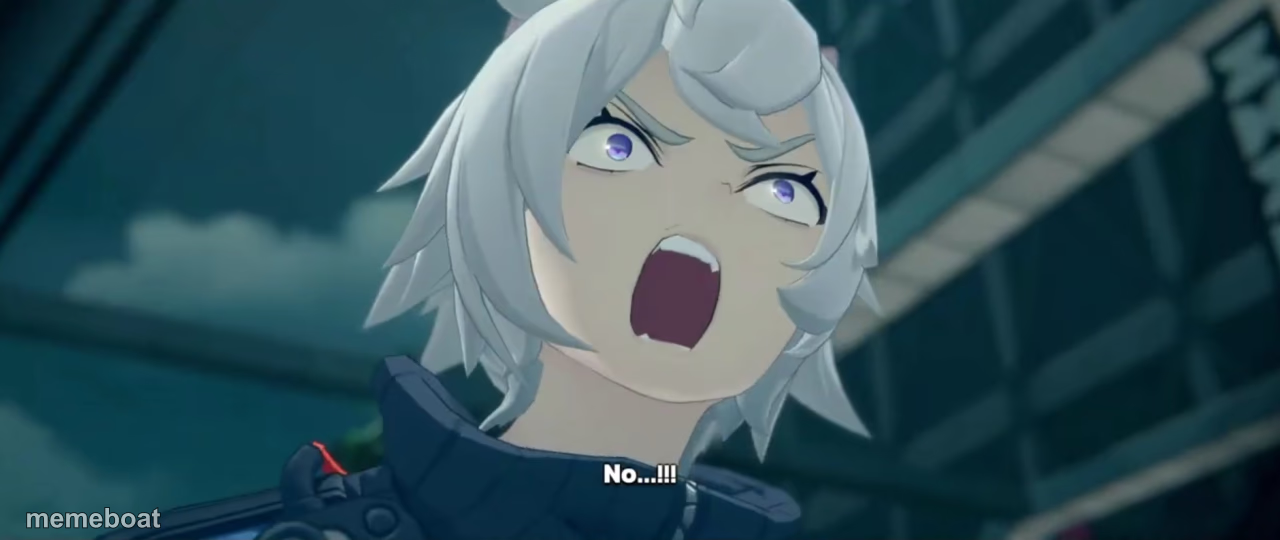
Silver-haired anime character mid-scream shouting 'No...!!!' in a game cutscene. Perfect for denial, panic, or refusal reactions. Caption it free.
Blank Seth no meme template
Download the blank Seth no template to caption it yourself, or add your text right here in the editor above and download the finished meme.
When to use the Seth no meme
- Watching your team's last-second shot rim out at the buzzer
- Seeing the wifi icon spin during the final boss fight
- Finding out the meeting could have been an email, after sitting through it
Seth no template facts
- Dimensions
- 1280 × 540 px
- Format
- PNG
- Text boxes
- 2
- Added
- 2025
About the Seth no meme template
Wide-eyed, mouth open, and absolutely losing it: this silver-haired anime character's cutscene freakout captures that exact split-second when everything goes wrong and all you can manage is 'No...!!!' The dramatic lighting and glassy tower backdrop make it feel like the plot just took a hard left turn.
Use it for the moment you get the group project reassigned to you, watch your favorite character get written off a show, or realize you replied-all to the whole company. It's peak anime overreaction energy, ready for your own caption.
Popular Seth no caption ideas
ME OPENING MY LAPTOP · AND SEEING 47 UNREAD SLACK MESSAGES
WHEN THE ENDING · GETS RETCONNED IN THE SEQUEL
FINDING OUT THE SALE · ENDED YESTERDAY





Seth no meme FAQ
How do I make a Seth no meme?
Scroll up to the Seth no template, type your caption into the 2 text boxes in the editor above, adjust the font, size and color if you like, then click download. Your finished Seth no meme is ready to share in seconds.
Can I use the Seth no template for free?
Yes. The Seth no template is completely free to use — no signup and no limits on how many memes you create or where you share them.
How do I download my Seth no meme?
Click the download button under the editor once your Seth no meme looks right. It saves straight to your device as a high-quality PNG or JPEG image.
How do I download the blank Seth no template?
Use the "Download blank template" button in the blank Seth no template section above to save the original, un-captioned image — handy if you'd rather caption it in another app or keep a copy.